
Parts of a Computer (Peripherals) – Basic 1 Basic Technology Lesson Note (Second Term)
Download Lesson NoteLesson note at a glance
- Subject
- Basic Technology
- Class
- Basic 1
- Term
- Second Term
- Topic
- Parts of a Computer (Peripherals)
- Order
- Topic 2 of 22 this term
- Reading time
- 1 min
Topic: Computer Peripherals and Storage
What are Peripherals?
Peripherals are extra parts that we connect to the computer to make it do more things. They help us use the computer better.
Input and Output Devices
Printer:
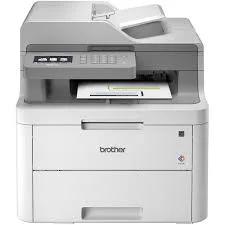
- Prints words and pictures on paper
- Connected to the computer with cables
- We can print our schoolwork
- Different types print in color or black
Scanner:
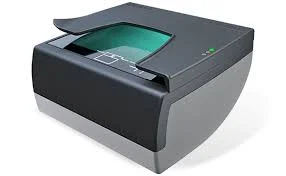
- Takes pictures of books and papers
- Puts the pictures into the computer
- Like a special camera for documents
- Helps copy important papers
Storage Devices
Hard Disk:
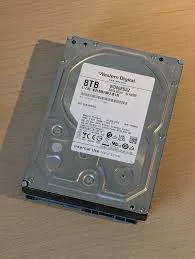
- Lives inside the computer
- Stores all our games, pictures, and work
- Like a big box that remembers everything
- Keeps things safe even when computer is off
Flash Drive (USB):

- Small device we can carry around
- Plugs into the computer
- Stores our work and pictures
- We can take it to different computers
RAM (Random Access Memory):
- Helps the computer work fast
- Like the computer’s thinking space
- Computer uses it when working
- More RAM makes computer faster
ROM (Read Only Memory):

- Stores important computer instructions
- Tells the computer how to start
- Cannot be changed easily
- Always stays in the computer
Connection Devices
USB Cable:
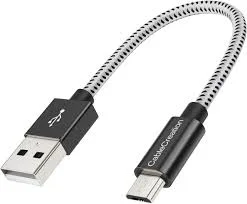
- Wire that connects things to computer
- Has special ends that fit in computer
- Helps transfer information
- Different sizes for different devices
OTG (On-The-Go):
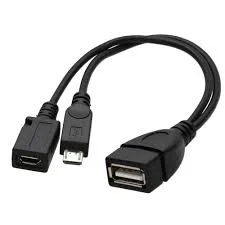
- Special connector for phones and tablets
- Lets us connect USB things to small devices
- Helps share files between devices
- Small and easy to carry
Class Exercise
- What does a printer do?
- Where does a hard disk stay?
- What is a flash drive used for?
- Show me how big a USB cable connector is.
This term's Basic Technology topics
Basic 1 Second Term · 22 topics
- Air
- Parts of a Computer (Peripherals)
- Games (Local Games)
- Demonstrating Air in Space
- Starting Up a Computer
- Games: Basic Skills in Ball Games
- Soil
- Starting Up a Computer
- Soil II: Importance & Things Found in Soil
- Basic Safety for Computers
- Safety Rules in Football Games
Second Term Basic Technology Lesson Notes for Other Topics
Games - Basic Skills in Ball Games
Read the full lesson note.

Starting Up a Computer
Read the full lesson note.
Demonstrating Air in Space
Read the full lesson note.
Games (Local Games)
Read the full lesson note.
Air
Read the full lesson note.

Starting Up a Computer
Read the full lesson note.
Basic Safety for Computers
Read the full lesson note.
Safety Rules in Football Games
Read the full lesson note.
Light Energy, Uses of Light and Colour
Read the full lesson note.
Computer Room
Read the full lesson note.
Swimming (Aquatic)
Read the full lesson note.
Colour Identification 1 - Colours of Objects
Read the full lesson note.

Computer Room
Read the full lesson note.
Colour Identification II- Road Traffic Light Signs
Read the full lesson note.
Revision
Read the full lesson note.
Lesson Notes for Other Classes

Basic 2 Lesson Note
The complete lesson note to guide your studies.

Basic 3 Lesson Note
The complete lesson note to guide your studies.

Basic 4 Lesson Note
The complete lesson note to guide your studies.

Basic 5 Lesson Note
The complete lesson note to guide your studies.

Basic 6 Lesson Note
The complete lesson note to guide your studies.
JSS1 Lesson Note
The complete lesson note to guide your studies.

