
Input Devices – Basic 3 Basic Science Lesson Note (Second Term)
Download Lesson NoteLesson note at a glance
- Subject
- Basic Science
- Class
- Basic 3
- Term
- Second Term
- Topic
- Input Devices
- Order
- Topic 16 of 16 this term
- Reading time
- 1 min
What are Input Devices?
Input devices are computer parts that help us put information INTO the computer.
Common Input Devices
Mouse:

- Points and clicks on things on screen
- Has left and right buttons
- Scroll wheel in the middle
- Moves cursor (arrow) on screen
Keyboard:
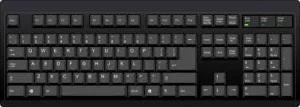
- Used for typing letters and numbers
- Has QWERTY layout (first 6 letters on top row)
- Space bar for spaces between words
- Enter key to go to next line
Scanner:

- Copies pictures and documents into computer
- Put paper on glass, press button
- Makes digital copies of photos and papers
- Saves scanned items as computer files
Flash Drive (USB):
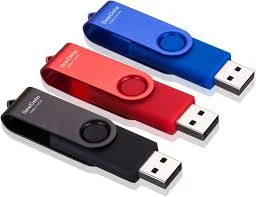
- Small storage device you can carry
- Plugs into USB port on computer
- Stores files like photos, documents, music
- Can transfer files between computers
Hard Drive:

- Main storage inside computer
- Stores operating system and all programs
- Much bigger storage than flash drive
- Permanent storage – keeps files when computer is off
Exercise 2: Match the devices:
- For typing words: _______
- For pointing on screen: _______
- For copying pictures: _______
- For storing many files: _______
CLASS ACTIVITIES
Soil Investigation
If possible, bring different soil samples:
- Look at soil with a magnifying glass
- Feel different types – sandy, clay, loamy
- Find small living things in soil
Exercise 3: Soil Detective!
- What color is the soil outside our classroom? _______
- Can you see small stones in soil? _______
- Why do plants need soil? _______
Input Device Hunt
Look around the classroom/computer lab: Exercise 4: Find and count:
- Keyboards: _______
- Mice: _______
- Computers with hard drives: _______
- USB ports: _______
Practical Exercise
If computers are available:
- Practice moving mouse cursor around screen
- Type your name on keyboard
- Find the USB ports on computer
This term's Basic Science topics
Basic 3 Second Term · 16 topics
- Water: Packaged Water
- Soil I: Importance to Plants
- Soil II: Importance to Animals
- Air in Motion I: Wind
- Air in Motion II: Harmful Effects of Wind
- Water
- Qualities of Water
- Water: Purifying Water
- Water: Packaged Water
- Soil I: Importance to Plants
- Input Devices
Second Term Basic Science Lesson Notes for Other Topics
Demonstrating Air in Space
Read the full lesson note.
Air
Read the full lesson note.
Light Energy, Uses of Light and Colour
Read the full lesson note.
Colour Identification 1 - Colours of Objects
Read the full lesson note.
Colour Identification II- Road Traffic Light Signs
Read the full lesson note.
Colour Identification III - Road Markings
Read the full lesson note.
Soil
Read the full lesson note.
Soil II: Importance & Things Found in Soil
Read the full lesson note.
Water - Purifying Water
Read the full lesson note.
Water - Packaged Water
Read the full lesson note.
Soil I - Importance to Plants
Read the full lesson note.
Air in Motion I - Wind
Read the full lesson note.
Air in Motion II - Harmful Effects of Wind
Read the full lesson note.
Water
Read the full lesson note.
Qualities of Water
Read the full lesson note.
Lesson Notes for Other Classes

Basic 1 Lesson Note
The complete lesson note to guide your studies.

Basic 2 Lesson Note
The complete lesson note to guide your studies.

Basic 4 Lesson Note
The complete lesson note to guide your studies.

Basic 5 Lesson Note
The complete lesson note to guide your studies.

Basic 6 Lesson Note
The complete lesson note to guide your studies.

JSS1 Lesson Note
The complete lesson note to guide your studies.

