Keyboards – Basic 1 Basic Technology Lesson Note (First Term)
Download Lesson NoteLesson note at a glance
- Subject
- Basic Technology
- Class
- Basic 1
- Term
- First Term
- Topic
- Keyboards
- Order
- Topic 13 of 20 this term
- Reading time
- 1 min
Topic: Learning About Computer Keyboards
What is a Keyboard?
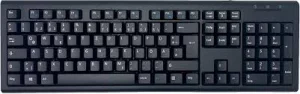
A keyboard is a part of the computer that has many buttons with letters, numbers, and symbols. We use it to type words.
Parts of a Keyboard
Letter Keys:
- All 26 letters of the alphabet
- From A to Z
- We press them to write words
- Each letter has its own button
Number Keys:
- Numbers from 0 to 9
- At the top of the keyboard
- We press them to write numbers
- Used for counting and math
Space Bar:
- The longest key at the bottom
- We press it to make spaces between words
- Without it, all words stick together
- Very important for typing
Special Keys:
- Enter key – to go to the next line
- Shift key – to make capital letters
- Backspace – to erase mistakes
- Arrow keys – to move the cursor
How to Use a Keyboard
Proper Way to Type:
- Sit up straight
- Place both hands on the keyboard
- Use your fingers gently
- Look at the keys as you type
Finding Letters:
- Start with letters you know
- Look for your name letters
- Practice pressing one key at a time
- Don’t press too hard
Class Exercise
- What do we use a keyboard for?
- How many letters are on a keyboard?
- Which key makes spaces between words?
- Show me where the number keys are on a keyboard.
This term's Basic Technology topics
Basic 1 First Term · 20 topics
- Movement (Throwing)
- Energy I
- Energy II
- Energy III
- Energy IV
- Keyboards
- Sports and Games (Athletics)
- Water
- Athletics (Jumping)
- Water II
- CPU (Central Processing Unit)
First Term Basic Technology Lesson Notes for Other Topics

Energy IV
Read the full lesson note.
Energy III
Read the full lesson note.
Energy II
Read the full lesson note.

Energy I
Read the full lesson note.

Movement (Throwing)
Read the full lesson note.

Parts of a Computer
Read the full lesson note.
Non-Living Things
Read the full lesson note.

Moving our Body Parts
Read the full lesson note.
Living Things II
Read the full lesson note.
Movement
Read the full lesson note.
Basic Computer
Read the full lesson note.
Living Things
Read the full lesson note.
Revision of First Term : PHE
Read the full lesson note.

CPU (Central Processing Unit)
Read the full lesson note.
Water II
Read the full lesson note.
Lesson Notes for Other Classes

Basic 2 Lesson Note
The complete lesson note to guide your studies.

Basic 3 Lesson Note
The complete lesson note to guide your studies.

Basic 4 Lesson Note
The complete lesson note to guide your studies.

Basic 5 Lesson Note
The complete lesson note to guide your studies.

Basic 6 Lesson Note
The complete lesson note to guide your studies.
JSS1 Lesson Note
The complete lesson note to guide your studies.