
Parts of a Computer – Basic 1 Basic Technology Lesson Note (First Term)
Download this term · ₦1,000Lesson note at a glance
- Subject
- Basic Technology
- Class
- Basic 1
- Term
- First Term
- Topic
- Parts of a Computer
- Order
- Topic 7 of 20 this term
- Reading time
- 1 min
Topic: Learning About Computer Parts
Main Parts of a Computer
Monitor (Screen):
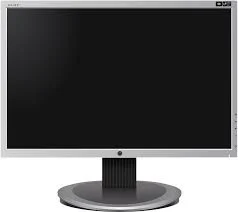
- This is like a television screen
- We look at it to see words and pictures
- It shows us what the computer is doing
Keyboard:
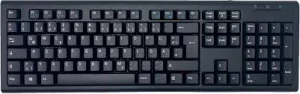
- Has many buttons with letters and numbers
- We press the buttons to write
- Each button is called a key
Mouse:
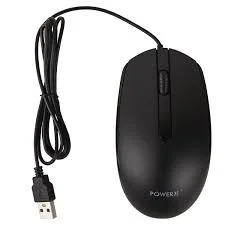
- Small thing we hold in our hand
- We move it to point at things on screen
- Has buttons we can click
System Unit (CPU):

- The main box of the computer
- This is the brain of the computer
- It makes the computer work
Class Exercise
- What part of the computer do we look at?
- What do we use to write on a computer?
- Draw a computer mouse.
- Which part is called the brain of the computer?
This term's Basic Technology topics
Basic 1 First Term · 20 topics
- Basic Computer
- Movement
- Living Things II
- Moving Our Body Parts
- Non-Living Things
- Parts of a Computer
- Movement (Throwing)
- Energy I
- Energy II
- Energy III
- Energy IV
Get Basic Technology as PDF and Word
Every week of Basic 1 Basic Technology, First Term, formatted and ready to print. Ad-free, and the copy lock comes off.
Get this term Card, bank transfer, USSD or OPay
Basic 1 Basic Technology Lesson Notes for Other Topics
Living Things
Read the full lesson note.
Basic Computer
Read the full lesson note.
Movement
Read the full lesson note.
Living Things II
Read the full lesson note.

Moving our Body Parts
Read the full lesson note.
Non-Living Things
Read the full lesson note.

Movement (Throwing)
Read the full lesson note.

Energy I
Read the full lesson note.
Energy II
Read the full lesson note.
Energy III
Read the full lesson note.

Energy IV
Read the full lesson note.

Keyboards
Read the full lesson note.
Sports and Games (Athletics)
Read the full lesson note.
Water
Read the full lesson note.
Athletics (Jumping)
Read the full lesson note.
Lesson Notes for Other Classes
Basic 2 Lesson Note
The complete lesson note to guide your studies.

Basic 3 Lesson Note
The complete lesson note to guide your studies.

Basic 4 Lesson Note
The complete lesson note to guide your studies.
Basic 5 Lesson Note
The complete lesson note to guide your studies.
Basic 6 Lesson Note
The complete lesson note to guide your studies.
