
Types of Network Devices – SS3 Data Processing Lesson Note (First Term)
Download this term · ₦1,000Lesson note at a glance
- Subject
- Data Processing
- Class
- SS3
- Term
- First Term
- Topic
- Types of Network Devices
- Order
- Topic 3 of 9 this term
- Reading time
- 5 min
Network devices are hardware components used to connect computers and other electronic devices so that they can share files and resources.
Behavioural objectives
By the end of the lesson, students should be able to:
- Define network devices.
- List nine types of network devices.
- Describe the function of each network device.
- Differentiate between a hub and a switch.
- State the benefits of networking.
Instructional techniques
- Identification: students identify each device from pictures.
- Explanation: the teacher explains the function of each device.
- Questions and answers: students answer oral questions on each device.
- Demonstration: the teacher shows real devices where available.
- Videos from source: short videos on how the devices work.
Instructional materials
- Videos
- Loudspeaker
- Pictures
- Data Processing for Senior Secondary Education by Hiit Plc
- WAPB Computer Studies for Senior Secondary I by Adekunle et al
- Online materials
What are network devices?
Network devices are components used to connect computers or other electronic devices so that they can share files or resources.
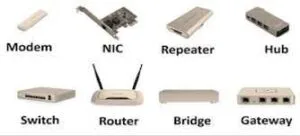
- Network: two or more computers or devices linked together to share data and resources.
- Resources shared: files, printers, scanners, fax machines and internet access.
What are the types of network devices?
There are nine common network devices: hub, switch, modem, router, network interface card, repeater, bridge, gateway and access point.
What is a hub?
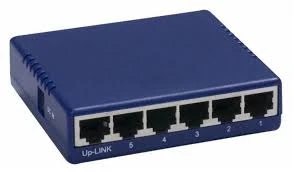
A hub is a device that joins multiple computers or other network devices to form a single network.
- Connection point: it is a common connection point for devices in a network.
- No intelligence: it does not read the data passing through it.
- Source and destination: it is not aware of where the data came from or where it is going.
What is a switch?
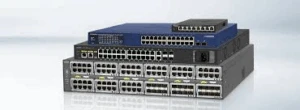
A network switch is a small hardware device that joins multiple computers together within a local area network (LAN).
- More intelligence: it generally contains more intelligence than a hub.
- Inspects packets: it checks each data packet as it is received.
- Finds addresses: it determines the source and destination device of each packet.
- Forwards data: it sends each packet only to the correct device.
What is the difference between a hub and a switch?
A hub passes data on without reading it, while a switch reads each packet and sends it to the right device.
| Feature | Hub | Switch |
|---|---|---|
| Intelligence | None | More intelligent |
| Reads data packets | No | Yes |
| Knows source and destination | No | Yes |
| Forwarding of data | Not directed to a chosen device | Forwarded to the correct device |
What is a modem?
A modem (MOdulator-DEModulator) is an electronic device that allows computers to communicate over telephone lines.
- Modulation: it converts the computer’s digital signals into signals that can travel on the line.
- Demodulation: it converts incoming signals back into digital data the computer can use.

What is a router?
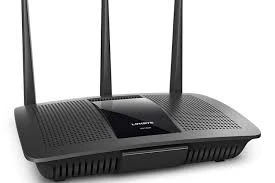
A router is a device that joins multiple wired or wireless networks together.
- Directs data: it decides the path that data packets take between networks.
- Internet access: it is commonly used to share one internet connection among many devices.
What is a network interface card (NIC)?
A network interface card (NIC) is a circuit board or card installed in a computer so that it can be connected to a network.
- Wired or wireless: a NIC can connect a computer by cable or by wireless signal.
- Needed by every computer: a computer must have one before it can join a network.
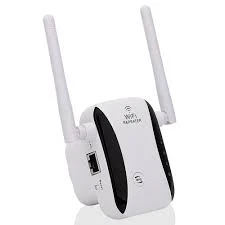
What is a repeater?
A repeater is a device that extends the length of a signal so that it can travel further on the same network.
- Copies the signal: it copies the signal bit by bit.
- Regenerates it: it sends the signal on again at its original strength.
- Layer: it operates at the physical layer.
What is a bridge?
A bridge is a device that joins any two networks or host segments together.
- Main function: it stores and relays frames among the connected segments.
- MAC address: it transfers frames using the MAC (Media Access Control) address.
- Filtering: it uses MAC addresses to decide which frames cross to the other segment.
- Larger LAN: it links different physical LANs together to form a bigger logical LAN.
What is a gateway?
A gateway is a passage that interlinks two networks together.
- Messenger agent: it takes data from one system, interprets it and transfers it to another system.
- Protocol converter: it is also called a protocol converter.
- Layers: it can operate at various network layers.
What is an access point?
An access point is a device that connects wireless devices to a wired network.
- Wireless to wired: it lets phones, laptops and tablets join a wired network without cables.
- Ports: it has ports that help to expand the size of the network.
- Extra services: some access points also provide firewall capabilities and DHCP service.
- Combined roles: some units can also act as a switch, DHCP server, router and firewall.

What is the summary of network devices and their functions?
| Device | Main function |
|---|---|
| Hub | Joins devices into one network without reading data |
| Switch | Joins devices in a LAN and forwards packets to the right device |
| Modem | Allows communication over telephone lines |
| Router | Joins wired or wireless networks together |
| NIC | Connects a computer to a network |
| Repeater | Regenerates a signal to extend its range |
| Bridge | Joins two segments using MAC addresses |
| Gateway | Converts protocols between two networks |
| Access point | Connects wireless devices to a wired network |
What are the benefits of networking?
The benefits of networking are cheaper software licences, easy file sharing, communication, easy backup and shared resources.
- Cheaper licences: site (software) licences are likely to be cheaper than buying several standalone licences.
- File sharing: files can easily be shared between users.
- Communication: network users can communicate by email and instant messenger.
- Easy backup: data is easy to back up because it is stored on the file server.
- Direct sharing: networking offers a quick and easy way to share files directly.
- Shared resources: all computers in the network can share printers, fax machines, modems and scanners.
Evaluation
- Mention and explain five types of network devices.
- Discuss four benefits of computer networking.
- State two differences between a hub and a switch.
- What does the word MODEM stand for?
Assignment
Draw a table with two columns, “Device” and “Function”, and fill it in for the nine network devices taught.
This term's Data Processing topics
SS3 First Term · 9 topics
Get Data Processing as PDF and Word
Every week of SS3 Data Processing, First Term, formatted and ready to print. Ad-free, and the copy lock comes off.
Get this term Card, bank transfer, USSD or OPay
SS3 Data Processing Lesson Notes for Other Topics
Introduction to Computer Networking
Read the full lesson note.
Computer Networking
Read the full lesson note.
Internet I - Electronic Mail/ E-Mail Accounts
Read the full lesson note.
Internet II - Internet & Search Engines
Read the full lesson note.
Computer Virus
Read the full lesson note.
Maintenance of Computer I
Read the full lesson note.
Maintenance of Computer II
Read the full lesson note.

Career Opportunities in Data Processing
Read the full lesson note.
Introduction to Application Package
Read the full lesson note.
Word Processing
Read the full lesson note.
Word Processing II
Read the full lesson note.
Spreadsheet
Read the full lesson note.
Graphic Package - Corel Draw
Read the full lesson note.
Database Management System (DBMS)
Read the full lesson note.
Lesson Notes for Other Classes

SS1 Lesson Note
The complete lesson note to guide your studies.

SS2 Lesson Note
The complete lesson note to guide your studies.
