
Computer Networking – SS3 Data Processing Lesson Note (First Term)
Download this term · ₦1,000Lesson note at a glance
- Subject
- Data Processing
- Class
- SS3
- Term
- First Term
- Topic
- Computer Networking
- Order
- Topic 2 of 9 this term
- Reading time
- 5 min
A computer network is a group of computers and devices connected so that they can share files and other resources.
Behavioural objectives
At the end of the lesson, students should be able to:
- Define a computer network and give two reasons for using one.
- List the types of computer network.
- Explain the personal area network (PAN), local area network (LAN), metropolitan area network (MAN) and wide area network (WAN).
- Explain the client-server network and the peer-to-peer (P2P) network.
- Distinguish between a LAN and a WAN, and between a client-server network and a P2P network.
Instructional techniques
- Identification
- Explanation
- Questions and answers
- Demonstration
- Videos from source
Instructional materials
- Videos
- Loudspeaker
- Pictures
- Data Processing for Senior Secondary Education by Hiit Plc
- WAPB Computer Studies for Senior Secondary I by Adekunle et al
- Online materials
What is a computer network?
A computer network is a set of two or more computers and devices linked together to share data, hardware and services.
- Node: any computer or device connected to the network, such as a PC, printer or phone.
- Resource: anything shared on the network, such as files, a printer or an internet connection.
- Link: the cable or wireless connection that joins the nodes.
Why do people use computer networks?
People use networks to share resources and to communicate faster.
- File sharing: users send and open the same files without carrying a flash drive.
- Hardware sharing: many computers use one printer or scanner, which saves cost.
- Internet sharing: one internet connection serves many users.
- Communication: users exchange email and messages quickly.
How are computer networks classified?
Networks are grouped by the area they cover and by how they share resources.
- By area covered: PAN, LAN, MAN and WAN.
- By how resources are shared: client-server network and peer-to-peer (P2P) network.
What are the types of computer networks?
There are six types covered in this lesson: personal area network, local area network, metropolitan area network, wide area network, client-server network and peer-to-peer network.
What is a personal area network (PAN)?
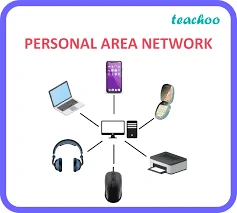
A personal area network is a computer network organised around one person.
- Devices: a mobile computer, a cell phone and/or a handheld device such as a PDA (personal digital assistant).
- Uses: transfer of files, including email, calendar appointments, digital photos and music.
- Range: very short, usually a few metres around the user.
- Example: a phone sending music to a wireless headset or to a laptop.
What is a local area network (LAN)?
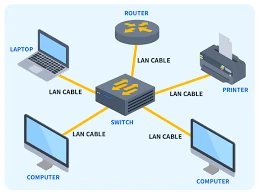
A local area network (LAN) is a network that connects computers and devices in a limited geographical area.
- Places: a home, school, computer laboratory, office building or closely positioned group of buildings.
- Node: each computer or device on the network is a node.
- Example: the computers in a school computer laboratory sharing one printer.
What is a metropolitan area network (MAN)?
A metropolitan area network (MAN) is a large computer network that usually spans a city or a large campus.
- Size: bigger than a LAN but smaller than a WAN.
- Makeup: it often joins several LANs within the same city.
- Example: a university linking its faculties across a large campus.
What is a wide area network (WAN)?

A wide area network (WAN) is a computer network that covers a large geographic area such as a city or country, or spans even intercontinental distances.
- Media: it uses a communications channel that combines many types of media, such as telephone lines, cables and airwaves.
- Carriers: it often uses transmission facilities provided by common carriers, such as telephone companies.
- Example: the Internet is the best-known WAN.
What is a client-server network?

A client-server network is designed for end-users, called clients, to access resources from a central computer called a server.
- Client: a computer or user that requests a resource or service.
- Server: a central computer that stores resources and serves the clients.
- Resources: files, songs, video collections or some other service.
- Control: the server manages access, so security and backup are easier to handle.
What is a peer-to-peer (P2P) network?

In its simplest form, a peer-to-peer (P2P) network is created when two or more PCs are connected and share resources without going through a separate server computer.
- Peers: every computer has equal status and can share its own files.
- Ad hoc connection: a couple of computers connected via a Universal Serial Bus (USB) to transfer files.
- Best for: small groups, such as a home or a small office.
What is the difference between a LAN, a MAN and a WAN?
A LAN covers a small area, a MAN covers a city, and a WAN covers a country or more.
| Feature | LAN | MAN | WAN |
|---|---|---|---|
| Area covered | Room, building or small group of buildings | City or large campus | Country or across continents |
| Size | Smallest of the three | Medium | Largest |
| Example | School computer laboratory | University campus network | The Internet |
What is the difference between a client-server network and a P2P network?
A client-server network uses a central server, while a P2P network has no central server.
| Feature | Client-server network | Peer-to-peer network |
|---|---|---|
| Central computer | Has a server | Has no separate server |
| Role of computers | Clients request, the server provides | Each computer shares and requests |
| Control of access | Managed from the server | Managed on each computer |
| Best size | Medium to large groups | Small groups |
Evaluation
- Define a computer network.
- List and explain all the types of networks.
- State two uses of a computer network.
- Name the network type that covers a school computer laboratory.
Classwork: As in the evaluation.
The teacher ends the lesson by commending the students.
Assignment
Answer both parts: (a) state the difference between a local area network (LAN) and a wide area network (WAN); (b) explain how a client-server network differs from a peer-to-peer (P2P) network.
This term's Data Processing topics
SS3 First Term · 9 topics
Get Data Processing as PDF and Word
Every week of SS3 Data Processing, First Term, formatted and ready to print. Ad-free, and the copy lock comes off.
Get this term Card, bank transfer, USSD or OPay
SS3 Data Processing Lesson Notes for Other Topics
Introduction to Computer Networking
Read the full lesson note.
Types of Network Devices
Read the full lesson note.
Internet I - Electronic Mail/ E-Mail Accounts
Read the full lesson note.
Internet II - Internet & Search Engines
Read the full lesson note.
Computer Virus
Read the full lesson note.
Maintenance of Computer I
Read the full lesson note.
Maintenance of Computer II
Read the full lesson note.
Career Opportunities in Data Processing
Read the full lesson note.
Introduction to Application Package
Read the full lesson note.
Word Processing
Read the full lesson note.
Word Processing II
Read the full lesson note.
Spreadsheet
Read the full lesson note.
Graphic Package - Corel Draw
Read the full lesson note.
Database Management System (DBMS)
Read the full lesson note.
Lesson Notes for Other Classes

SS1 Lesson Note
The complete lesson note to guide your studies.

SS2 Lesson Note
The complete lesson note to guide your studies.
