Digitalization of Data – SS1 Data Processing Lesson Note (First Term)
Download Lesson NoteLesson note at a glance
- Subject
- Data Processing
- Class
- SS1
- Term
- First Term
- Topic
- Digitalization of Data
- Order
- Topic 2 of 5 this term
- Reading time
- 6 min
Digitalization is the process of converting information into digital format. This information may represent an object, image, sound, document or signal (usually an analogue signal) organised into a discrete set of points or samples. This is the binary data that computers and many devices with computing capacity (such as digital cameras and digital hearing aids) can process.
Digitalization can also be defined as the integration of digital technologies into everyday life. The digital system uses a binary numeric system in which electronic pulses are represented by either 0 for a low pulse or 1 for a high pulse. Digital systems can represent symbols such as alphanumeric characters, which stand for real-world data, more easily than analogue systems.
Behavioural objectives
By the end of the lesson, students should be able to:
- define digitalization and state its benefits;
- list the types of digital computer;
- describe the tools and purposes of each information age;
- describe early counting devices and state their disadvantages;
- name the three components of a computer system;
- state the functions of the control unit and the arithmetic and logic unit.
What are the benefits of digitalization?
- Long-term preservation of documents
- Orderly archiving of documents
- Easy and customised access to information
- Easy information dissemination through images and text, CD-ROM, Internet, intranets and extranets
What are the types of digital computer?
- Microcomputers
- Mini computers
- Mainframe computers
- Supercomputers
Technology of different information ages
The ages are:
- Stone age
- Iron age
- Middle age
- Industrial age
- Electronic age
| Information age | Tools used | Purpose | Time | Examples of tools in that age |
|---|---|---|---|---|
| Stone age | Stone | Sewing, counting, defence, transaction, storage | Below 12th century | Basalt, sandstone, flint, etc. |
| Iron age | Iron | Defence, agriculture | 12th century | Hoes and cutlass |
| Middle age | Writing materials | Knowledge transfer, education | 12th and 13th century | Pen, feather, etc. |
| Industrial age | Coal | Power, development, faster movement | Late 18th and early 19th century | Cars, ships, etc. |
| Electronic age | Writing materials | Storage, accuracy, timelines | Late 19th century and above | Circuit, processor |
What were the early counting devices?
In the early days of man’s existence on earth, counting and simple arithmetic were performed using different parts of the body and some other counting aids. The following are devices used by people of ancient times:
- Fingers and toes
- Stone
- Sticks
- Pebbles
- Cowries
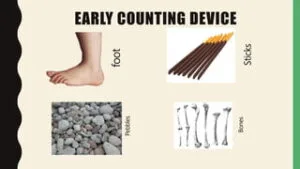
Some early counting devices
1. Fingers and toes
In ancient times, calculations were done by the use of fingers and toes. Fingers were used for simple addition, and toes were used together with fingers to count up to twenty. The following problems were faced when using fingers and toes to count:
- They could not be used conveniently to count numbers more than twenty.
- The result obtained from counting with fingers could not be easily remembered.
2. Stones and pebbles
Stones were introduced for counting because of the limitations of counting with fingers and toes. Counting with stones involves building a pile of stones where each represents a quantity. The following were problems faced using stones as counting devices:
- Large numbers of stones were too heavy to carry from one place to another.
- It was cumbersome to count if the counting process involved large numbers.
3. Grains
The use of grains was introduced because of the heaviness of stones. Grains include kernels, beans, rice and corn. Grains were used in the same way as stones.
4. Sticks
Sticks are small pieces of wood used for counting in place of stones and grains. Children in nursery and primary schools use match sticks for counting.
5. Marks on the wall
This involves the use of sharp objects to draw lines on the wall for counting. Continuous marks make the wall dirty.
What are the disadvantages of early counting devices?
- They are difficult to carry about.
- Counting and calculation take a lot of time.
- They are prone to mistakes.
- They cannot be used to count or calculate large numbers.
- Their results cannot be easily remembered.
- They have no storage facilities.
What are the components of a computer system?
A computer system consists of three main parts, also called components:
- Hardware
- Software
- Peopleware
Hardware component
Computer hardware is the physical parts of the computer that we see, feel and handle. It consists of devices for input, processing, storage, output and communications.
Hardware can be divided into two sections:
- System unit (CPU)
- The peripherals
System unit (CPU)
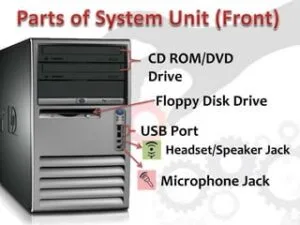
The CPU is the brain of the computer system. It can be subdivided into:
- Control unit
- Arithmetic and logic unit
- Memory unit
Control unit
This is the unit of the computer system that fetches instructions from the main storage, interprets them and issues all the necessary signals to the components making up the system.
Arithmetic and logic unit
This part of the CPU is where all arithmetic operations are carried out in the computer. The unit is also involved in decision-making. Logic functions such as less than (<), equal to (=) and greater than (>) are operations of comparison used for decision-making.
Memory unit
The memory, or primary storage unit, is the place in the computer where the program and the data are stored. The computer memory is divided into two types:
- Random Access Memory (RAM)
- Read Only Memory (ROM)
Peripherals
The peripherals are devices outside the CPU that function under the control of the CPU, for example the mouse, keyboard and printer.

Peripherals are in three categories:
- Input devices
- Output devices
- Auxiliary storage devices
Software component
Software is the set of instructions used to direct the computer hardware to perform its tasks. It allows users to do work and allows the computer to operate.
Another name for software is program. A program is a sequence of instructions given to a computer to solve a given problem or accomplish a given task. There are two main classes of software:
- System software
- Application software
System software
These are programs written by the manufacturer to control the smooth running of the computer.
Application software
These are programs written by programmers to instruct the computer to perform a particular task.
Peopleware
Peopleware means the people who make and use the computer. They range from professional users to operational users. A user is anyone who makes use of a computer. Without people, the computer cannot work. There are two main classes of people:
- Computer professionals
- Computer users
Evaluation
- Define digitalization.
- State three benefits of digitalization.
- List the types of digital computer.
- State four disadvantages of early counting devices.
- Name the three components of a computer system and the two classes of software.
Assignment
- List the five information ages and state one tool used in each.
- Explain the functions of the control unit and the arithmetic and logic unit.
- Explain why stones and grains were introduced as counting devices, and state one problem with each.
This term's Data Processing topics
SS1 First Term · 5 topics
- History of Computing
- Digitalization of Data
- Data and Information
- History of Computer
- Classification of Computers
First Term Data Processing Lesson Notes for Other Topics

Database Management System II - How to Create Database
Read the full lesson note.
Database Management System I
Read the full lesson note.
Data Model
Read the full lesson note.
Data Modeling
Read the full lesson note.
Data Modeling II - Standard Data Model & Examples
Read the full lesson note.
Normalization
Read the full lesson note.
Data Model II - Types of Data Modelling
Read the full lesson note.

Entity-Relationship Models
Read the full lesson note.
Classification Of Computers
Read the full lesson note.
History Of Computer
Read the full lesson note.
Data And Information
Read the full lesson note.
History Of Computing
Read the full lesson note.
Introduction to Computer Networking
Read the full lesson note.
Internet I - Electronic Mail/ E-Mail Accounts
Read the full lesson note.
Internet II - Internet & Search Engines
Read the full lesson note.
Lesson Notes for Other Classes

Basic 1 Lesson Note
The complete lesson note to guide your studies.

Basic 2 Lesson Note
The complete lesson note to guide your studies.

Basic 3 Lesson Note
The complete lesson note to guide your studies.

Basic 4 Lesson Note
The complete lesson note to guide your studies.

Basic 5 Lesson Note
The complete lesson note to guide your studies.

Basic 6 Lesson Note
The complete lesson note to guide your studies.