
Computer Hardware – SS1 Digital Technologies Lesson Note (First Term)
Download this term · ₦1,000Lesson note at a glance
- Subject
- Digital Technologies
- Class
- SS1
- Term
- First Term
- Topic
- Computer Hardware
- Order
- Topic 4 of 8 this term
- Reading time
- 5 min
Computer hardware is all the physical parts of a computer that you can see and touch.
Subject: Digital Technologies
Class: SS1
Behavioural objectives
By the end of the lesson, students should be able to:
- define computer hardware;
- name the two main groups of hardware: the system unit and peripheral devices;
- give examples of input, output and storage devices;
- explain the difference between internal and external storage;
- explain the difference between the system unit and peripheral devices.
What is computer hardware?
Hardware is the set of physical parts of a computer that you can see and touch.
- Body comparison: a human has a brain to think, hands to pick things up and a voice to speak. A computer has hardware parts that do similar jobs.
- Hardware: the physical “body” of the computer, such as the keyboard, screen and hard drive.
- Software: the programs and apps that run on the hardware, such as Windows, WhatsApp and games.
- Working together: hardware cannot do useful work without software, and software cannot run without hardware.
What are the two groups of hardware?
Hardware has two groups: the system unit and peripheral devices.
- System unit: the main box or case that houses the CPU, the brain of the computer. On a laptop, the part under the keyboard is the system unit.
- Peripheral devices: the extra parts connected to the system unit. They help the computer take in and give out information.
What is inside the system unit?
The system unit is the case that holds the parts the computer needs to process data.
- Motherboard: the main circuit board that connects all the other parts.
- CPU (Central Processing Unit): the brain that carries out instructions and processes data.
- RAM (Random Access Memory): the working memory that holds data and programs in use. It is cleared when power goes off.
- Internal hard drive: the permanent storage for the operating system, apps and files.
- Power supply unit: the part that gives electric power to the other parts.
- Without a CPU: the computer cannot process anything and is only a metal box.
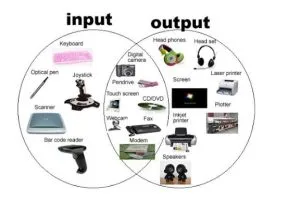
What are input devices?
An input device is any piece of hardware that sends data into the computer.
- Keyboard: for typing text and commands.
- Mouse: for pointing and clicking.
- Scanner: for turning a paper document or photo into a digital file.
- Microphone: for putting sound or voice into the computer.
- Webcam: for capturing video and photos.
- Joystick: for controlling movement in games.
- Touchscreen: for entering data by touching the screen, as on a phone or tablet. It also shows output.
- Memory aid: Input means Put In. You are putting data into the machine.
What are output devices?
An output device is any piece of hardware that gives processed information from the computer to the user.
- Monitor (screen): shows text, pictures and video as you work.
- Printer: gives a hard copy, which is your work on paper.
- Speakers and headphones: give sound.
- Projector: shows the computer screen on a wall or screen for many people.
What are soft copy and hard copy?
Output is either soft copy or hard copy.
| Type | Meaning | Example |
|---|---|---|
| Soft copy | Output you see or hear but cannot hold | Monitor display, sound from speakers |
| Hard copy | Output printed on paper | Printed letter from a printer |
What are storage devices?
A storage device is hardware that keeps data and files so they stay after the power is switched off.
What is internal storage?
- Meaning: storage fixed inside the system unit.
- Example: the internal hard drive.
- Holds: the operating system (such as Windows), apps and main files.
What is external or removable storage?
- Flash drive (USB stick): small, portable and very common.
- External hard drive: saves very large amounts of data, such as many films.
- Memory card (SD card): the small chip used in phones and cameras.
- Optical disc: CDs and DVDs, now less common.
What is the difference between internal and external storage?
| Point | Internal storage | External storage |
|---|---|---|
| Position | Inside the system unit | Outside, plugged in when needed |
| Portability | Stays in the computer | Can move between computers |
| Example | Internal hard drive | Flash drive, SD card |
What is the difference between RAM and a hard drive?
| Point | RAM | Hard drive |
|---|---|---|
| Purpose | Holds data in use right now | Keeps files for a long time |
| Power off | Data is lost | Data stays |
What is the difference between the system unit and peripheral devices?
The system unit is the core of the computer, while a peripheral device is any part connected on the outside.
- System unit: the “engine room” with the motherboard, CPU and RAM.
- Peripheral device: a part on the outside, such as a printer or mouse. You can unplug it and the computer still starts.
| Point | System unit | Peripheral devices |
|---|---|---|
| Position | Main case | Connected outside it |
| Importance | Computer cannot work without it | Computer still starts without them |
| Examples | Motherboard, CPU, RAM | Mouse, keyboard, printer, monitor, external hard drive |
What are the types of peripheral devices?
- Input peripherals: mouse, keyboard.
- Output peripherals: printer, monitor.
- Storage peripherals: external hard drive, flash drive.
Evaluation
- Look around your computer lab. List three hardware parts you can see.
- What is the main difference between a keyboard and a monitor? (Hint: think input and output.)
- Why do we need a hard drive if we already have RAM?
- Is a USB flash drive a “system” device or a “peripheral” device? Why?
Assignment
List two input devices, two output devices and two storage devices. Write one sentence on what each one does.
This term's Digital Technologies topics
SS1 First Term · 8 topics
Get Digital Technologies as PDF and Word
Every week of SS1 Digital Technologies, First Term, formatted and ready to print. Ad-free, and the copy lock comes off.
Get this term Card, bank transfer, USSD or OPay
SS1 Digital Technologies Lesson Notes for Other Topics
Introduction to Digital Technologies
Read the full lesson note.
History and Evolution of Digital Technologies
Read the full lesson note.

Number System
Read the full lesson note.

Operating System (OS)
Read the full lesson note.

Computer Maintenance and Safety
Read the full lesson note.
Data Representation and Safety
Read the full lesson note.

Introduction to Renewable Energy
Read the full lesson note.
Computer Networks
Read the full lesson note.
Internet Technologies
Read the full lesson note.

Email and Online Communication
Read the full lesson note.
Digital Storage and Cloud Computing
Read the full lesson note.

Cybersecurity I
Read the full lesson note.
Cybersecurity II - Protection Methods
Read the full lesson note.

Data Privacy and Data Ethics
Read the full lesson note.

Social Media Technologies
Read the full lesson note.
Lesson Notes for Other Classes

SS2 Lesson Note
The complete lesson note to guide your studies.

SS3 Lesson Note
The complete lesson note to guide your studies.
