
Basic Safety for Computer Room – Basic 1 Basic Technology Lesson Note (Second Term)
Download this term · ₦1,000Lesson note at a glance
- Subject
- Basic Technology
- Class
- Basic 1
- Term
- Second Term
- Topic
- Basic Safety for Computer Room
- Order
- Topic 21 of 22 this term
- Reading time
- 2 min
Learning Objectives:
By the end of the lesson, pupils should be able to:
- Follow safety rules in the computer room
- Handle computers properly and safely
Introduction:
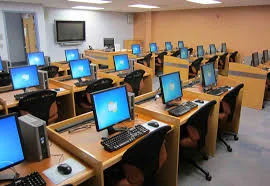
The computer room has expensive machines that can break easily. We must follow special rules to keep ourselves and the computers safe.
Lesson Content:
Safety Rules for Computer Room:
Personal Safety:
- Walk Slowly: Never run in the computer room
- Sit Properly: Keep both feet on the floor
- Good Posture: Sit straight and look at the screen properly
- Take Breaks: Rest your eyes every few minutes
Keeping Computers Safe:
- Clean Hands: Always wash hands before touching computers
- Gentle Touch: Press keys softly, do not bang them
- No Food or Drinks: Keep all food and drinks away
- Dry Hands: Make sure hands are completely dry
Electrical Safety:
- No Water: Never bring water near computers
- Report Problems: Tell teacher if you see sparks or smell something strange
- Proper Cables: Do not pull or step on computer wires
- Turn Off Safely: Always ask teacher before turning anything on or off
Classroom Behavior:
- Listen First: Pay attention to teacher’s instructions
- Ask Questions: Raise your hand if you need help
- Share Nicely: Take turns and share computers
- Stay Seated: Do not move around without permission
Emergency Rules:
- If something spills, call the teacher immediately
- If a computer makes strange noises, stop using it
- If you feel scared, tell your teacher right away
- Never try to fix problems by yourself
Class Activity:
Practice proper sitting position and gentle typing movements in the air.
Evaluation Questions:
- How should you walk in the computer room?
- What should you do before touching a computer?
- Should you bring water into the computer room?
- Who should you tell if something goes wrong?
- How should you press the computer keys?
Assignment:
Tell your parents three safety rules for the computer room.
This term's Basic Technology topics
Basic 1 Second Term · 22 topics
- Light Energy, Uses of Light and Colour
- Computer Room
- Swimming (Aquatic)
- Colour Identification 1: Colours of Objects
- Computer Room
- Safety Rules in Swimming
- Colour Identification II: Road Traffic Light Signs
- Revision
- Colour Identification III: Road Markings
- Basic Safety for Computer Room
- Revision II
Get Basic Technology as PDF and Word
Every week of Basic 1 Basic Technology, Second Term, formatted and ready to print. Ad-free, and the copy lock comes off.
Get this term Card, bank transfer, USSD or OPay
Basic 1 Basic Technology Lesson Notes for Other Topics
Air
Read the full lesson note.

Parts of a Computer (Peripherals)
Read the full lesson note.
Games (Local Games)
Read the full lesson note.
Demonstrating Air in Space
Read the full lesson note.

Starting Up a Computer
Read the full lesson note.
Games - Basic Skills in Ball Games
Read the full lesson note.
Soil
Read the full lesson note.

Starting Up a Computer
Read the full lesson note.
Soil II: Importance & Things Found in Soil
Read the full lesson note.
Basic Safety for Computers
Read the full lesson note.
Safety Rules in Football Games
Read the full lesson note.
Light Energy, Uses of Light and Colour
Read the full lesson note.
Computer Room
Read the full lesson note.
Swimming (Aquatic)
Read the full lesson note.
Colour Identification 1 - Colours of Objects
Read the full lesson note.
Lesson Notes for Other Classes

Basic 2 Lesson Note
The complete lesson note to guide your studies.

Basic 3 Lesson Note
The complete lesson note to guide your studies.

Basic 4 Lesson Note
The complete lesson note to guide your studies.

Basic 5 Lesson Note
The complete lesson note to guide your studies.

Basic 6 Lesson Note
The complete lesson note to guide your studies.
