
Database Management System – SS1 Data Processing Lesson Note (Third Term)
Download this term · ₦1,000Lesson note at a glance
- Subject
- Data Processing
- Class
- SS1
- Term
- Third Term
- Topic
- Database Management System
- Order
- Topic 3 of 6 this term
- Reading time
- 5 min
A database management system (DBMS) is computer software that lets users define, create and maintain a database.
- Role: it acts as an interface between the database and end users or application programs.
- Tasks: it interacts with the user, other applications and the database itself to capture and analyse data.
- Result: data stays organised and easy to access.
Behavioural objectives
By the end of the lesson, students should be able to:
- Define a database and a database management system.
- State the functions of a DBMS.
- Name examples of database management packages.
- Explain common database terms such as character, field, record, row and column.
- Create a database and a table in MS Access.
What is a database?
A database is an organised collection of data or records stored in a structured way.
- Purpose: it stores information so that it can be found, changed and used easily.
- Example: a school keeps student names, registration numbers and classes in one database.
- Structure: data is arranged in tables made of rows and columns.
What is a database management system?
A database management system is a collection of computer software that enables users to define, create and maintain a database.
- General purpose: to allow the definition, creation, querying and administration of a database.
- Interface: it sits between the database and end users or application programs.
- Consistency: it keeps data consistently organised and easily accessible.
- Database administrator: the person who controls the database system, including access and security.
What is the difference between a database and a DBMS?
- Database: the organised collection of data itself.
- DBMS: the software used to create, manage and protect that data.
| Database | DBMS |
|---|---|
| A collection of stored data | Software that manages the data |
| Holds tables, rows and columns | Provides tools to build and use the tables |
| Example: a student table | Example: Microsoft Access |
What are the functions of a DBMS?
A DBMS makes it possible for users to create, edit and update data in database files.
- Concurrent access: several users can use the same database at the same time.
- Security: it creates security rules that decide the access rights of each user.
- Data integrity: it improves the accuracy and consistency of the data in the database.
- Data dictionary: it provides a description of the data stored in the database.
- Querying: it lets users search for and retrieve the data they need.
What are examples of database management packages?
There are many database management systems, and five common ones are Microsoft Access, MySQL, Oracle, Microsoft SQL Server and FileMaker.
- Microsoft Access: a DBMS developed by Microsoft. It stores data in its own format based on the Access Jet engine. It can import or link directly to data stored in other databases.
- MySQL: an open-source DBMS and one of the most popular.
- Oracle: an object-relational database management system.
- Microsoft SQL Server: developed by Microsoft. It stores and retrieves data as requested by other applications, on the same computer or across a network.
- FileMaker: a cross-platform relational database management system. It began as an MS-DOS-based program.
What are the common database terms?
The common database terms are character, field, record, row and column.
- Character: a single symbol in a file, such as a letter or digit.
- Field: a group of related characters in a file, such as a surname.
- Record: several related fields treated together as one entity, such as all the details of one student.
- Row: a horizontal line in a table that holds one record.
- Column: a vertical line in a table that holds one field, such as all the surnames.
How is data arranged from the smallest unit to the database?
- Characters join to form a field.
- Fields join to form a record.
- Records join to form a file (a table in MS Access).
- Tables join to form a database.
What is the difference between a field and a record?
- Field: one item of information about a person or thing.
- Record: the complete set of fields for one person or thing.
| Point | Field | Record |
|---|---|---|
| Position in a table | Column | Row |
| Made up of | Related characters | Related fields |
| Example | Surname | REG. No., Surname and First Name of one student |
How do you use MS Access to create a database?
MS Access is a relational database management system used to create and modify databases on a computer.
How do you load MS Access?
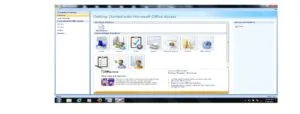
- Click on the Start Menu.
- Point to All Programs.
- Point to Microsoft Office.
- Click on Microsoft Office Access.
How do you create a database?
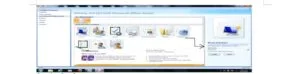
- From the displayed window, click on Blank Database.
- On the right-hand side of the window, where the arrow is pointing in the picture above, click inside the file name text box and type the desired database name.
- Click on the Create command button. A database with the file name given will be created.
- Note: files are created as tables in the database.
How do you create a file (table)?
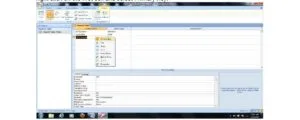
- Click on the Create menu and select Table.
- At the All Tables tab, right-click on any of the tables.
- Select Design View.
- In the Save As dialogue box, type a desired table name (for example, Student Table) in the Table Name text box.
- Click OK.
What are rows and columns in a table?
Tables in a database are made of rows and columns, as in the picture below.
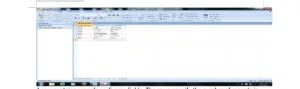
- Row: contains a record made up of several fields. The rows show the number of records in the table.
- Column: usually represents a field and holds one type of information.
- Example (rows): in the picture above, there are six records in the student table.
- Example (columns): in the picture above, there are three fields: REG. No., Surname and First Name.
Evaluation
- Define a database management system.
- State four functions of a DBMS.
- List three examples of database management packages.
- What is the difference between a field and a record?
- Outline the steps for creating a database in MS Access.
Assignment
Explain the terms character, field, record, row and column, then list the steps for loading MS Access on a computer.
This term's Data Processing topics
SS1 Third Term · 6 topics
- Word Processing II
- Spreadsheet
- Database Management System
- Database Management System II
- Computer Ethics
- Safety Measures
Get Data Processing as PDF and Word
Every week of SS1 Data Processing, Third Term, formatted and ready to print. Ad-free, and the copy lock comes off.
Get this term Card, bank transfer, USSD or OPay
SS1 Data Processing Lesson Notes for Other Topics

Word Processing II
Read the full lesson note.

Spreadsheet
Read the full lesson note.
Database Management System II
Read the full lesson note.

Computer Ethics
Read the full lesson note.

Safety Measures
Read the full lesson note.

History Of Computing
Read the full lesson note.
Digitalization Of Data
Read the full lesson note.
Data And Information
Read the full lesson note.

History Of Computer
Read the full lesson note.

Classification Of Computers
Read the full lesson note.

ICT Application In Everyday Life
Read the full lesson note.

The Art Of Information Processing
Read the full lesson note.
Process Of Information Transmission
Read the full lesson note.
Medium to Information Transmission
Read the full lesson note.

Operating System
Read the full lesson note.
Lesson Notes for Other Classes

SS2 Lesson Note
The complete lesson note to guide your studies.

SS3 Lesson Note
The complete lesson note to guide your studies.
