
Better Typing Skills – Basic 3 Computer Studies Lesson Note (Third Term)
Download this term · ₦1,000Lesson note at a glance
- Subject
- Computer Studies
- Class
- Basic 3
- Term
- Third Term
- Topic
- Better Typing Skills
- Order
- Topic 6 of 7 this term
- Reading time
- 1 min
Better Typing Skills
Proper Finger Position:
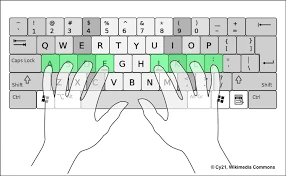
- Left hand types: Q, W, E, R, T, A, S, D, F, G, Z, X, C, V, B
- Right hand types: Y, U, I, O, P, H, J, K, L, N, M
- Thumbs press the space bar
- Look at screen, not at keyboard
Special Keys:
- Shift + letter = CAPITAL LETTER
- Tab = moves cursor to the right
- Delete = removes letter after cursor
- Backspace = removes letter before cursor
- Enter = starts new line
Formatting Your Text:
- Select text by clicking and dragging
- Bold = Ctrl + B or click B button
- Italic = Ctrl + I or click I button
- Underline = Ctrl + U or click U button
- Font size = click number dropdown (12, 14, 16)
Saving Your Work Properly
Save Options:
- Save (Ctrl + S) = keeps same name and location
- Save As = choose new name or different location
- Auto Save = computer saves automatically every few minutes
Good Saving Habits:
- Save every 5-10 minutes while working
- Use clear names like “My Story” or “Math Homework”
- Save in Documents folder so you can find it easily
- Make backup copies of important work
File Types:
- .doc = older Word document
- .docx = newer Word document (better)
- .txt = simple text file
- .pdf = can’t be changed easily
Exercise 2:
- Which fingers press the space bar? _______
- What does Ctrl + B do? _______
- How often should you save your work? _______
This term's Computer Studies topics
Basic 3 Third Term · 7 topics
Get Computer Studies as PDF and Word
Every week of Basic 3 Computer Studies, Third Term, formatted and ready to print. Ad-free, and the copy lock comes off.
Get this term Card, bank transfer, USSD or OPay
Third Term Computer Studies Lesson Notes for Other Topics
Booting
Read the full lesson note.
Steps of Booting
Read the full lesson note.
My Desktop (Review)
Read the full lesson note.
Revision
Read the full lesson note.
Personalizing My Computer
Read the full lesson note.

Standard Toolbar Buttons
Read the full lesson note.
Menu Bar
Read the full lesson note.
Main Menus In Microsoft Word
Read the full lesson note.
Typing And Saving On Microsoft Word
Read the full lesson note.

Formatting in Microsoft Word
Read the full lesson note.

Microsoft Word - Toolbar
Read the full lesson note.
Shutting Down The Computer
Read the full lesson note.
Classification of Computers By Purpose 2
Read the full lesson note.
Classification of Computer By Purpose
Read the full lesson note.

Classification Of Computers - 4th & 5th Generation
Read the full lesson note.
Lesson Notes for Other Classes
Basic 1 Lesson Note
The complete lesson note to guide your studies.

Basic 2 Lesson Note
The complete lesson note to guide your studies.

Basic 4 Lesson Note
The complete lesson note to guide your studies.

Basic 5 Lesson Note
The complete lesson note to guide your studies.

Basic 6 Lesson Note
The complete lesson note to guide your studies.
JSS1 Lesson Note
The complete lesson note to guide your studies.
