
Relational Models II – SS2 Data Processing Lesson Note (Second Term)
Lesson note at a glance
- Class
- SS2
- Subject
- Data Processing
- Term
- Second Term
- Reading time
- 8 min
What are integrity constraints in the relational model?
An integrity constraint (IC) is a condition on a database schema that restricts the data which can be stored in an instance of the database.
- Schema: the design of the database, including its tables, attributes and rules.
- Instance: the data stored in the database at a given time.
- Legal instance: a database instance that satisfies all the integrity constraints set on the schema.
- Role of the DBMS: it permits only legal instances to be stored in the database.
Behavioural objectives
By the end of the lesson, students should be able to:
- explain what an integrity constraint and a legal instance are;
- name the four types of integrity constraints and explain domain, entity and referential integrity;
- list the four types of key constraints and say what each one means;
- write a simple SELECT query in Microsoft Access that returns, restricts and sorts records;
- explain the difference between combining criteria with AND and with OR in the query design grid.
What is database integrity?
Database integrity is the validity and consistency of the data stored in a database.
- Constraints: integrity is usually expressed as constraints, which are consistency rules the database is not permitted to violate.
- Scope: a constraint may apply to each attribute, or to relationships between tables.
- Protection: constraints make sure that updates, deletions and insertions by authorised users do not cause a loss of data consistency.
- Purpose: they guard against accidental damage to the database.
Example: a blood group must be ‘A’, ‘B’, ‘AB’ or ‘O’ only. It cannot be any other value.
What are the types of integrity constraints?
There are four types of integrity constraints: domain integrity, entity integrity, referential integrity and key constraints.
Domain integrity
Domain integrity is the definition of a valid set of values for an attribute.
For each attribute, you can define:
- Data type: for example text, number or date.
- Length or size: the maximum space the value may take.
- Null value: whether the attribute may be left empty.
- Uniqueness: whether each value must be different from all others.
- Default value: the value used when none is entered.
- Range: the values in between which are allowed, for example scores from 0 to 100.
- Specific values: a fixed list of allowed values, as in the blood group example.
Entity integrity constraint
The entity integrity rule states that in any relation, the value of a primary key attribute cannot be null.
Example: in the relation STUDENT, Stu_id is the primary key and must not be null.
- Other attributes may contain null values.
- In the table below, Branch has one null value, which is allowed.
| Stu_id | Name | Branch |
|---|---|---|
| 11255234 | Aman | CSE |
| 11255369 | Kapil | ECE |
| 11255324 | Ajay | |
| 11255237 | Raman | CSE |
| 11255678 | Aastha | ECE |
Referential integrity constraint
The referential integrity rule states that a foreign key value must either match a primary key value in its home relation, or be null.
- Home relation: the table in which the foreign key is the primary key.
- Purpose: it stops a record from pointing to a record that does not exist.
- Example: in the baseball database used later, STATS holds a PLAYER_ID. Each PLAYER_ID must match a player ID in the PLAYERS table.
Key constraints
A key constraint is a condition that a certain minimal subset of the fields of a relation is a unique identifier for a tuple.
There are four types of key constraints:
- Super key: a set of one or more attributes that uniquely identifies each tuple, for example Stu_id, or Stu_id with Name.
- Candidate key: a minimal super key, from which no attribute can be removed without losing uniqueness.
- Primary key: the candidate key chosen to identify the tuples of a relation. It must be unique and cannot be null.
- Foreign key: an attribute in one relation that refers to the primary key of another relation.
How do you query a relational database?
A query is a request for data from a database, and SELECT is the SQL command used to retrieve it.
- Several RDBMS vendors provide a GUI (graphical user interface) to help users build queries.
- A GUI helps novice users learn the main ideas of query building without worrying about syntax.
- Microsoft Access is used here because it has one of the most user-friendly interfaces.
- The lesson uses a database of baseball statistics to show the basics of SELECT queries.
A. Open the Access database and review its tables
- Open the database in MS Access.

- Navigation Pane: the panel on the left side of the Access window, just beneath the Ribbon.
- Ribbon: the strip of controls along the top of the window.
- Function of the Navigation Pane: it gives access to the objects in the database, such as tables, queries, forms and reports.
- On opening baseball_stats.accdb: the pane shows the word Tables at the top, listing PLAYERS, STATS and TEAMS.
- Double-click a table’s name in the Navigation Pane to open it. Open all three tables and review the content.
- The STATS table stores an ID for each player, not his name.
- The names that go with the IDs are stored in the PLAYERS table.
B. Write a simple SELECT query
The first query retrieves data from selected fields in the STATS table.
- Click the Create tab near the top of the application window.
- Click the Query Design button, on the left of the Create Ribbon in the group labelled Queries.
- In the Show Table dialog, double-click the STATS table to add it to the query, then click Close. In Access 2010, the ribbon switches to the Design ribbon.
- Double-click PLAYER_ID in the list of STATS fields to add it to the design grid below.
- Repeat this step to add the YEAR and RBI fields.

- To see the SQL created by your GUI settings, use the View drop-down list on the far left of the Design Ribbon. It is also available on the Home tab, as shown below.
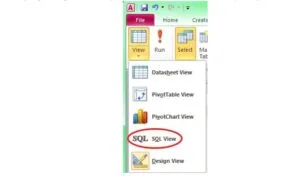
- As you do the next steps, look at the SQL that matches each query you build.
C. Restrict the returned records to a desired subset
- From the same View drop-down list, select Design View to return to the query design GUI.
- In the design grid, set the Criteria value for the RBI field to >99.
- Test the query by clicking the red exclamation point. It should return 103 records.
D. Sort the returned records
- Return to Design View.
- In the design grid, click in the Sort cell under the RBI column and select Descending from the drop-down list.
- Test the query. The records are now sorted from the highest RBI total to the lowest.
E. Add additional criteria to the selection
- Return to Design View and set the Criteria value for the YEAR field to >1989. This limits the results to seasons of 100 or more RBI since 1990.
- Test the query. It should return 53 records.
- Return to Design View and change the Criteria value for the YEAR field to >1989 And <2000. This limits the results to the 1990s.
- Test the query. It should return 34 records.
- Return to Design View and change the YEAR criteria back to >1989. In the “or” cell beneath it, add <1960.
- Aim: to find 100 RBI seasons since 1990 OR before 1960.
- Problem: the query as it now stands does not give this result, as the WHERE line in SQL view shows.
- What it returns: 100 RBI seasons since 1990, and all seasons before 1960, not just the 100 RBI ones.
F. Correct the OR criteria and test the query
- Repeat the >99 criterion in the RBI field’s “or” cell.
- Check the SQL view to see how the WHERE line has changed.
- Test the query. It should return 74 records.
- The output of these queries is not very easy to read, because it shows player IDs, not names.
- The next part of the lesson uses a join between two tables to add the players’ names to the output.
What is the difference between AND and OR in the query design grid?
AND and OR are two ways of combining criteria, and the grid position of each criterion decides which one applies.
- AND: a record is returned only if it meets all the criteria. Criteria are placed in the same row of the grid, or joined with And in one cell.
- OR: a record is returned if it meets any one of the criteria. The extra criterion is placed in the “or” row beneath.
| Feature | AND | OR |
|---|---|---|
| Position in grid | Same row, or And in one cell | Separate rows (“or” cell) |
| Record is returned when | All criteria are met | At least one row of criteria is met |
| Effect on results | Fewer records | More records |
| Example in the lesson | >1989 And <2000 (34 records) | >1989 or <1960, with >99 repeated in each row (74 records) |
Evaluation
- What is an integrity constraint, and what is a legal instance of a database?
- Name the four types of integrity constraints.
- Why can the Stu_id of the STUDENT relation not contain a null value, while Branch can?
- State the rule for referential integrity.
- In the Access query, what is the difference between putting two criteria in the same row of the design grid and putting one in the “or” cell?
Assignment
Write a one-page study sheet on integrity constraints and Access queries. It must contain three parts:
- An explanation of domain integrity, with the list of things you can define for an attribute.
- The four types of key constraints, with one line on each.
- The steps for creating a query in Access that returns the PLAYER_ID, YEAR and RBI fields from the STATS table, sorted from highest RBI to lowest.
This term's Data Processing topics
SS2 Second Term · 5 topics
SS2 Data Processing Lesson Notes for Other Topics
Data Security
Read the full lesson note.
Role Of Database Administration In Nigeria
Read the full lesson note.
File Organisation
Read the full lesson note.
Presentation Packages
Read the full lesson note.
Database Management System I
Read the full lesson note.

Database Management System II - How to Create Database
Read the full lesson note.
Data Model
Read the full lesson note.
Data Model II - Types of Data Modelling
Read the full lesson note.
Data Modeling
Read the full lesson note.
Data Modeling II - Standard Data Model & Examples
Read the full lesson note.
Normalization
Read the full lesson note.

Entity-Relationship Models
Read the full lesson note.
Graphic Packages
Read the full lesson note.
Web Design
Read the full lesson note.
Internet
Read the full lesson note.
Lesson Notes for Other Classes

SS1 Lesson Note
The complete lesson note to guide your studies.

SS3 Lesson Note
The complete lesson note to guide your studies.
