
Calculating and Processing Devices – SS1 Further Mathematics Lesson Note (Second Term)
Download this term · ₦1,000Lesson note at a glance
- Subject
- Further Mathematics
- Class
- SS1
- Term
- Second Term
- Topic
- Calculating and Processing Devices
- Order
- Topic 2 of 4 this term
- Reading time
- 3 min
A flowchart is a diagram that shows the steps of a solution to a problem, in order, using standard symbols and arrows.
Behavioural objectives
By the end of the lesson, students should be able to:
- Define a flowchart.
- Name and state the use of the common flowchart symbols.
- State the advantages of flowcharts.
- Explain how a flowchart helps in planning algorithms and solving problems.
- Draw a simple flowchart for a given problem.
What is a flowchart?
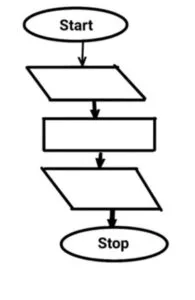
A flowchart is a diagrammatical representation of a solution to a problem.
- Steps: each step of the solution is placed in a symbol.
- Arrows: they join the symbols and show the order in which the steps are done.
- Use: it is drawn before a program is written, so the solution can be checked first.
What is an algorithm?
An algorithm is a finite list of clear steps for solving a problem.
- Algorithm: the steps written in words.
- Flowchart: the same steps drawn as a diagram.
What are the common flowchart symbols?
There are five common flowchart symbols: terminal, input/output, process, decision and flow line.
| Symbol | Name | Use |
|---|---|---|
| Rounded rectangle | Terminal | Marks the Start and the Stop of the flowchart. |
| Parallelogram | Input/Output | Shows data being read in or results being displayed. |
| Rectangle | Process | Shows a calculation or an action, such as Sum = A + B. |
| Diamond | Decision | Asks a yes/no question and gives two exits. |
| Arrow | Flow line | Shows the direction from one step to the next. |
What are the advantages of flowcharts?
- Programming: a flowchart plays an important role in computer programming.
- Problem solving: it facilitates the interpretation and solution of problems.
- Clarity: it can be easily understood.
- Planning: it can help in the planning and development of algorithms for solving problems.
What are the limits of flowcharts?
- Size: a flowchart for a long, complex problem becomes large and hard to follow.
- Changes: if the solution changes, the diagram must be redrawn.
What are the rules for drawing a flowchart?
- Begin with one Start symbol and end with one Stop symbol.
- Use the standard symbols only.
- Draw flow lines with arrowheads, usually top to bottom or left to right.
- Write short, clear words inside each symbol.
- Label the two exits of a decision symbol Yes and No.
- Keep the lines from crossing one another.
How do we draw a flowchart? Worked examples
Example 1: Add two numbers
The problem is to find and display the sum of two numbers, A and B.
- Start.
- Input A and B.
- Calculate Sum = A + B.
- Output Sum.
- Stop.
Example 2: Pass or fail
The problem is to decide whether a student passes, given a pass mark of 50.
- Start.
- Input the student’s score.
- Decision: is the score 50 or more?
- If Yes, output “Pass”.
- If No, output “Fail”.
- Stop.
Evaluation
- What is a flowchart?
- State four advantages of flowcharts.
- How does a flowchart help in solving problems?
- Name the flowchart symbol used for a decision and the symbol used for Start and Stop.
- List the steps in a flowchart that adds two numbers and displays the answer.
Assignment
Draw a flowchart that inputs two numbers, finds their average, and displays the result.
This term's Further Mathematics topics
SS1 Second Term · 4 topics
- Trigonometric Ratio of Special Angles and Logical Reasoning
- Calculating and Processing Devices
- Vectors in Two Dimensions
- The Straight Line on Coordinate Geometry
Get Further Mathematics as PDF and Word
Every week of SS1 Further Mathematics, Second Term, formatted and ready to print. Ad-free, and the copy lock comes off.
Get this term Card, bank transfer, USSD or OPay
SS1 Further Mathematics Lesson Notes for Other Topics

Trigonometric Ratio Of Special Angles And Logical Reasoning
Read the full lesson note.

Vectors In Two Dimensions
Read the full lesson note.
The Straight Line on Coordinate Geometry
Read the full lesson note.
Sets
Read the full lesson note.
Sets II - Operation of Set & Venn Diagrams
Read the full lesson note.
Indices And Logarithm
Read the full lesson note.
Surds
Read the full lesson note.
Linear Inequalities
Read the full lesson note.
Binary Operations
Read the full lesson note.
Sequence And Series
Read the full lesson note.
Sequence And Series II
Read the full lesson note.
Location - Measurement of Central Tendency
Read the full lesson note.

History And Nature Of Operations And Research
Read the full lesson note.
Models
Read the full lesson note.
Gravitational Field
Read the full lesson note.
Lesson Notes for Other Classes

SS2 Lesson Note
The complete lesson note to guide your studies.

SS3 Lesson Note
The complete lesson note to guide your studies.
