
System Application II – Basic 3 Basic Technology Lesson Note (Second Term)
Download this term · ₦1,000Lesson note at a glance
- Subject
- Basic Technology
- Class
- Basic 3
- Term
- Second Term
- Topic
- System Application II
- Order
- Topic 5 of 19 this term
- Reading time
- 1 min
Important Computer Applications
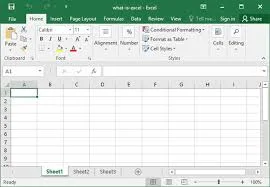
Microsoft Office: This is a group of programs that help with work:

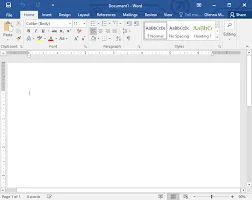
- PowerPoint – for making presentations

- Excel – for making lists and calculations
Mavis Beacon:
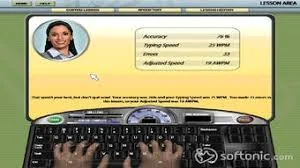
- Special program that teaches typing
- Shows you where to put your fingers on keyboard
- Has games to make typing practice fun
- Helps you type faster and without looking
- Good for children learning to use computers
Why These Applications are Important
- Help students do homework
- Make work easier and faster
- Teach important computer skills
- Used in offices and schools
Exercise 2: Answer these questions:
- Which program helps you type faster? _________
- What do you use PowerPoint for? _________
- Circle the Microsoft Office programs: Word / Calculator / Excel / Paint
This term's Basic Technology topics
Basic 3 Second Term · 19 topics
- Air in Motion I: Wind
- System Applications
- Ball Games: Football
- Air in Motion II: Harmful Effects of Wind
- System Application II
- Ball Games: Safety Rules in Football
- Water
- Difference Between Hardware and Software
- Tennis
- Qualities of Water
- Components of CPU
Get Basic Technology as PDF and Word
Every week of Basic 3 Basic Technology, Second Term, formatted and ready to print. Ad-free, and the copy lock comes off.
Get this term Card, bank transfer, USSD or OPay
Basic 3 Basic Technology Lesson Notes for Other Topics
Air in Motion I - Wind
Read the full lesson note.

System Applications
Read the full lesson note.

Ball Games - Football
Read the full lesson note.
Air in Motion II - Harmful Effects of Wind
Read the full lesson note.
Ball Games - Safety Rules in Football
Read the full lesson note.
Water
Read the full lesson note.

Difference between Hardware and Software
Read the full lesson note.

Tennis
Read the full lesson note.
Qualities of Water
Read the full lesson note.

Components of CPU
Read the full lesson note.
Water - Purifying Water
Read the full lesson note.
Components of Cpu
Read the full lesson note.
Water - Packaged Water
Read the full lesson note.
Ball Games - Basketball
Read the full lesson note.
Soil I - Importance to Plants
Read the full lesson note.
Lesson Notes for Other Classes
Basic 1 Lesson Note
The complete lesson note to guide your studies.
Basic 2 Lesson Note
The complete lesson note to guide your studies.

Basic 4 Lesson Note
The complete lesson note to guide your studies.
Basic 5 Lesson Note
The complete lesson note to guide your studies.
Basic 6 Lesson Note
The complete lesson note to guide your studies.
