
The Worksheets – SS2 Computer Studies Lesson Note (Second Term)
Download Lesson NoteLesson note at a glance
- Subject
- Computer Studies
- Class
- SS2
- Term
- Second Term
- Topic
- The Worksheets
- Reading time
- 4 min
A worksheet commonly refers to a sheet of paper with questions for students and places to record answers. The term may also refer to a single sheet of rows and columns in spreadsheet software or an informal piece of paper that an accountant uses to record information.
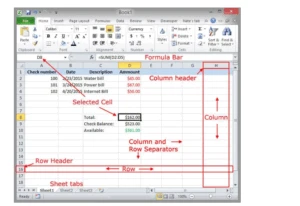
A worksheet or sheet is a single page in the file created with an electronic spreadsheet program such as Excel or Google Spreadsheets. A worksheet is used to store, manipulate, and display data. Each worksheet consists of cells where you key in and manipulate the data. By default, a new Excel workbook contains three worksheets.
Each worksheet is composed of a very large number of cells — which are the basic storage unit for data in the worksheet.
The cells are arranged in a grid pattern using rows and columns.
Excel 2016:
-
- There are 1,048,576 rows per worksheet.
- There are 16,384 columns per worksheet.
- By default, each worksheet contains only one worksheet.
- The number of rows or files is limited only by the amount of memory available on the computer.
In earlier versions of Excel, the default number of worksheets per file was three.
For Google Spreadsheets:
- There is a maximum of 256 columns per sheet.
- The maximum number of cells for all worksheets in a file is 400,000.
- The current default number of worksheets for new files is one.
- There is a maximum of 200 worksheets per spreadsheet file.
Each worksheet also has a name; by default, the worksheets are named Sheet1, Sheet2, etc.
Starting a workbook file
Workbooks are files that can be created in Excel. You can start a workbook any time you want to open a new file for your data. Steps are:
- Open a new workbook in Excel.
- Start on the open screen of your monitor.
- Click on all programs.
- Point to Microsoft Office.
- Select Microsoft Excel (this will take you to the Excel environment
Creating Excel document
Once Excel is open, you can enter data into a file by clicking on a particular cell, and then typing text, numbers, or formulas. Your changes will be entered into the current cell.
- Press the tab key to enter your data and move the active cell to the right of the current one.
- Press Enter to enter your data and move the active cell to the next row, usually in the same column.
- Use the arrow keys to enter your data and move the active cell in the indicated direction.
- Press the tab key (right-arrow key) to move to the last cell in a row.
Entering data in a worksheet
Locate the cell where you want to enter data on the worksheet and click on the cell. For example, point and click on cell A1.

- Type in your entry from the keyboard and notice the appearance of the entries in the formula bar within the cell address.
- Press the Enter key.
EVALUATION
- What are the steps involved in creating a spreadsheet?
- Explain how to enter data into Excel.
Editing data in a worksheet
Wrong entries may either be entirely retyped or the particular cell range of cells can be corrected.
To retype:
- Move the cell pointer to the cell to be corrected or re-type the entry and press Enter.
To correct only the mistake:
- Move the cell pointer to the cell and double-click on the cell.
- Correct by inserting, deleting, or replacing.
- Press Enter.
Saving a worksheet
Click the File menu.
- Click on the Save or Home button.
- Click the Save As button and wait for a dialog box to open.
- Type in your desired filename; for example, the name of the document.
- Click the ‘Save’ button or press Enter on the keyboard.
Retrieving a saved worksheet
Retrieving a worksheet means opening an already saved worksheet from its location on the computer. This is usually done to view, edit, or update the worksheet.
- Locate Microsoft Excel.
- Click on ‘Other Buttons.’
- Click the ‘Open’ option from the list and wait for a dialog box to open.
- Navigate to the file you want to open and double-click on it.
General evaluation
- Define a cell.
- State steps involved in saving a worksheet for the first time.
- Highlight the steps in retrieving a saved document.
Reading assignment
A Handbook on Computer Studies for Schools and Colleges by Niyi Adeokigbe
Weekend assignment
- ____ is a definition of cells organized into rows and columns where data is stored and manipulated in a file. a. Worksheet b. Grid c. Workbook d. Data Area
- ____ is organized in a worksheet based on the intersection of a row and a column. a. Worksheet b. Sheet c. Cell d. Cell reference
- A new Excel file can have ____ worksheets. a. 1,048,576 b. 16,384 c. 1,048,576 d. Three
- There are ____ columns per worksheet in Excel. a. 16,387 b. 16,384 c. 1,048,576 d. 10
- The address of a cell is known as ____ a. Cell space b. Cell reference c. Cell Menu d. Active Cell
THEORY
- Highlight the steps in saving a worksheet.
- Describe what you understand by the term “retrieving.”
Second Term Computer Studies Lesson Notes for Other Topics

Starting Up a Computer
Read the full lesson note.

Parts of a Computer (Peripherals)
Read the full lesson note.

Starting Up a Computer
Read the full lesson note.

Basic Safety for Computers
Read the full lesson note.

Computer Room
Read the full lesson note.

Computer Room
Read the full lesson note.

Basic Safety for Computer Room
Read the full lesson note.

System Application
Read the full lesson note.

Important Computer Applications
Read the full lesson note.

Difference Between Hardware And Software
Read the full lesson note.

Components Of CPU
Read the full lesson note.

More Parts Of The CPU
Read the full lesson note.

Arithmetic Logic Unit (ALU) & Storage Unit in CPU
Read the full lesson note.

Input Devices
Read the full lesson note.

Launching Microsoft Word
Read the full lesson note.
Lesson Notes for Other Classes

Basic 1 Lesson Note
The complete lesson note to guide your studies.

Basic 2 Lesson Note
The complete lesson note to guide your studies.

Basic 3 Lesson Note
The complete lesson note to guide your studies.

Basic 4 Lesson Note
The complete lesson note to guide your studies.

Basic 5 Lesson Note
The complete lesson note to guide your studies.

Basic 6 Lesson Note
The complete lesson note to guide your studies.

