
Introduction to Computer Graphics – SS1 Visual Arts Lesson Note (Second Term)
Download Lesson NoteLesson note at a glance
- Subject
- Visual Arts
- Class
- SS1
- Term
- Second Term
- Topic
- Introduction to Computer Graphics
- Order
- Topic 3 of 5 this term
- Reading time
- 3 min
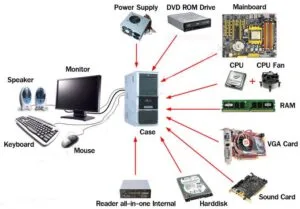
Computer graphics is the creation of graphic work such as drawings, logos and photographs on a computer. It needs hardware, the visible parts of the computer such as the monitor, keyboard, mouse and scanner, and software, the programs such as Corel Draw and Adobe Photoshop that run on it.
Behavioural objectives
By the end of the lesson, students should be able to:
- name and describe the main computer hardware devices used in graphics;
- explain what computer software is;
- distinguish between system software and application software, and give examples of application software;
- describe the four basic mouse techniques.
What is computer hardware?
Computer hardware is the visible and tangible components of the computer. They include:
- Monitor: This is a primary output device, equipment for displaying information or graphic works on the screen like a television set.
- System unit: It is the computer casing or cabinet that contains the central processing unit (CPU) and many other electronic components.
- Printer: This is an output device that enables you to print your graphic work on paper.
- Keyboard: The keyboard looks like a typewriter keyboard. It contains numerical keys, special character keys, control keys and function keys used to type text and issue commands.
- Mouse: A mouse is a hand-held pointing device that lets you point to, select and manipulate objects on the screen.
- Scanner: The scanner is an input device that is responsible for copying images in graphics, and translating them into a form that the computer can store and manipulate, for example a photograph, logo, drawing or other graphic symbol.
- Diskettes: They are magnetic disks used by a computer to store information.
What is computer software?
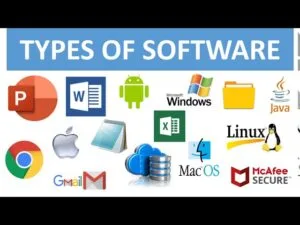
Software is the invisible part of a computer system. It is made up of programs designed to be used on a particular system. It is either system software or application software.
- System software: This controls the computer system.
- Application software: This is used with system software to perform specific tasks given to the computer by the user. Examples are Corel Draw, Harvard Graphics, Adobe Photoshop and Eye-Candy.
What are the four basic mouse techniques?
- Pointing
- Clicking
- Double-clicking
- Dragging and dropping
Pointing
Pointing means moving the mouse until the pointer on the screen rests on the object of interest.
Clicking
Clicking involves pointing to an item and quickly pressing and releasing the mouse button. There are two types of clicking:
- Left clicking: You click the left button while the pointer is over an object on the screen to select it.
- Right clicking: You click the right button while the pointer is over an object on the screen to bring up a menu of options.
Double-clicking
Double-clicking means clicking twice with your mouse button very fast.
Dragging and dropping
Holding down the mouse button while the pointer is on an object grabs the object. If you move the mouse while holding the button down, you can move (drag) the object to a new place on the screen.
Evaluation
- What is computer hardware? Name six examples.
- State the functions of the monitor, the printer and the scanner.
- What is the difference between system software and application software?
- List four examples of application software.
- Describe the two types of clicking.
Assignment
- List the four basic mouse techniques and explain each one.
- Describe the keyboard and the system unit.
This term's Visual Arts topics
SS1 Second Term · 5 topics
- Introduction to Graphics
- Textile Designs
- Introduction to Computer Graphics
- Terminologies in 2 Dimensional Art
- Terminologies in 3 Dimensional Art
Second Term Visual Arts Lesson Notes for Other Topics
Terminologies In 2 dimensional Art
Read the full lesson note.
Terminologies In 3 dimensional Art
Read the full lesson note.
Textile Designs
Read the full lesson note.
Introduction To Graphics
Read the full lesson note.
Lesson Notes for Other Classes

Basic 1 Lesson Note
The complete lesson note to guide your studies.

Basic 2 Lesson Note
The complete lesson note to guide your studies.

Basic 3 Lesson Note
The complete lesson note to guide your studies.

Basic 4 Lesson Note
The complete lesson note to guide your studies.

Basic 5 Lesson Note
The complete lesson note to guide your studies.

Basic 6 Lesson Note
The complete lesson note to guide your studies.

