
What Is a Computer – Basic 2 Computer Studies Lesson Note (First Term)
Download this term · ₦1,000Lesson note at a glance
- Subject
- Computer Studies
- Class
- Basic 2
- Term
- First Term
- Topic
- What Is a Computer
- Order
- Topic 1 of 6 this term
- Reading time
- 1 min
Learning Objectives: By the end of this lesson, pupils should be able to:
- recall what was learned about computers last term
- identify basic computer parts
Lesson Content:
Review of Last Term’s Work:
What is a Computer?
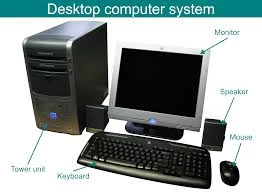
A computer is a machine that helps us do many things like learning, playing games, and storing information.
Basic Parts of Computer:
- Monitor: The screen where we see pictures and words
- Keyboard: Has letters and numbers for typing
- Mouse: Helps us point and click on the screen
- CPU: The main part that makes the computer work
What Computers Can Do:
- Help us learn new things
- Play educational games
- Draw pictures
- Store information
- Help teachers teach
This term's Computer Studies topics
Basic 2 First Term · 6 topics
Get Computer Studies as PDF and Word
Every week of Basic 2 Computer Studies, First Term, formatted and ready to print. Ad-free, and the copy lock comes off.
Get this term Card, bank transfer, USSD or OPay
Basic 2 Computer Studies Lesson Notes for Other Topics

History Of The Computer
Read the full lesson note.
Types of Computers
Read the full lesson note.
Analogue computer
Read the full lesson note.
Uses Of Special Keys On The Keyboard Tab Key
Read the full lesson note.
Use Of Special Keys On The Keyboard
Read the full lesson note.
Setting Of A Computer
Read the full lesson note.

Computer Icons
Read the full lesson note.
Mainframe And Super Computers
Read the full lesson note.
Mini And Micro Computers
Read the full lesson note.
Classification Of Computers By Generations
Read the full lesson note.
Classification Of Computers - Third Generation
Read the full lesson note.
Classification Of Computers - Fourth Generation
Read the full lesson note.

Classification Of Computers - 4th & 5th Generation
Read the full lesson note.
Classification of Computer By Purpose
Read the full lesson note.
Classification of Computers By Purpose 2
Read the full lesson note.
Lesson Notes for Other Classes

Basic 1 Lesson Note
The complete lesson note to guide your studies.

Basic 3 Lesson Note
The complete lesson note to guide your studies.

Basic 4 Lesson Note
The complete lesson note to guide your studies.

Basic 5 Lesson Note
The complete lesson note to guide your studies.

Basic 6 Lesson Note
The complete lesson note to guide your studies.
