
Monitor and Mouse – Basic 1 Basic Science Lesson Note (First Term)
Download Lesson NoteLesson note at a glance
- Subject
- Basic Science
- Class
- Basic 1
- Term
- First Term
- Topic
- Monitor and Mouse
- Order
- Topic 7 of 13 this term
- Reading time
- 1 min
Topic: Monitor and Mouse
The Monitor (Computer Screen)
What is a Monitor?
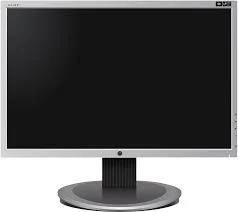
- The monitor is the screen of the computer
- It looks like a television screen
- We look at it to see what the computer is doing
What We See on the Monitor:
- Words and letters
- Pictures and colors
- Games and videos
- Numbers and shapes
Taking Care of the Monitor:
- Keep it clean
- Don’t touch the screen with dirty hands
- Don’t hit or bang it
- Turn it off when not using
The Mouse
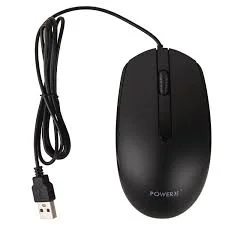
What is a Mouse?
- A small device we hold in our hand
- It helps us point at things on the screen
- Has buttons we can click
- Connected to the computer
Parts of a Mouse:
- Left button – for clicking
- Right button – for special clicks
- Wheel – for moving up and down
- Body – we hold this part
How to Use a Mouse:
- Hold it gently in your hand
- Move it on a flat surface
- Click the left button to select
- Don’t drop or throw it
Class Exercise
- What do we call the screen of a computer?
- How many buttons does a mouse have?
- Show me how to hold a computer mouse.
- What should we not do to the monitor screen?
This term's Basic Science topics
Basic 1 First Term · 13 topics
- Living Things II
- Non-Living Things
- Energy I
- Movement (Catching)
- Energy II
- Monitor and Mouse
- Safety
- Energy III
- Sports and Games (Athletics)
- Energy IV
- Water
First Term Basic Science Lesson Notes for Other Topics

Energy IV
Read the full lesson note.
Sports and Games (Athletics)
Read the full lesson note.
Energy III
Read the full lesson note.
Safety
Read the full lesson note.
Energy II
Read the full lesson note.
Movement (Catching)
Read the full lesson note.

Energy I
Read the full lesson note.
Non-Living Things
Read the full lesson note.
Living Things II
Read the full lesson note.
Living Things
Read the full lesson note.
Water II
Read the full lesson note.
Water
Read the full lesson note.
Measurement Of Length
Read the full lesson note.

Measurement Of Mass
Read the full lesson note.

Measurement Of Time
Read the full lesson note.
Lesson Notes for Other Classes
Basic 2 Lesson Note
The complete lesson note to guide your studies.

Basic 3 Lesson Note
The complete lesson note to guide your studies.

Basic 4 Lesson Note
The complete lesson note to guide your studies.

Basic 5 Lesson Note
The complete lesson note to guide your studies.

Basic 6 Lesson Note
The complete lesson note to guide your studies.
JSS1 Lesson Note
The complete lesson note to guide your studies.

