
Types of Network Devices SS3 Data Processing Lesson Note
Download Lesson NoteTopic: Types of Network Devices
SPECIFIC OBJECTIVES: At the end of the lesson, pupils should be able to
- List network devices
- State benefits of networking
INSTRUCTIONAL TECHNIQUES:
- Identification,
- explanation,
- questions and answers,
- demonstration,
- videos from source
INSTRUCTIONAL MATERIALS:
- Videos,
- loudspeaker,
- pictures,
- Data Processing for Senior Secondary Education by Hiit Plc,
- WAPB Computer Studies for Senior Secondary I by Adekunle et al,
- On-line Materials.
NOTE
NETWORKING DEVICES
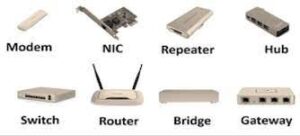
Network devices are components used to connect computers or other electronic devices so that they can share files or resources. Some network devices are examined below:
- Hubs: A hub is a device that joins multiple computers or other network devices to form a single network. It can also be defined as a common connection point for devices in a network. A hub does not read any of the data passing through it and is not aware of its source or destination.
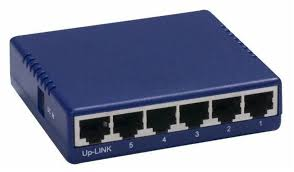
Switches: A network switch is a small hardware device that joins multiple computer networks together within a local area network. A switch generally contains more intelligence than a hub. Switches are capable of inspecting data packets as they are received, determining the source and destination device of each packet, and forwarding them appropriately.
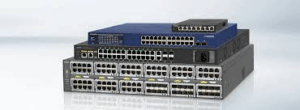
Modem (MOdulator-DEModulator): A modem is an electronic device that allows computers to communicate over telephone lines.
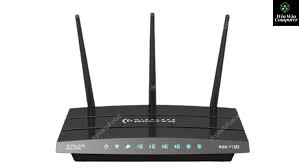
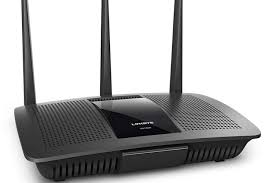
Router: Routers are devices that join multiple wired or wireless networks together.
Network Interface Card (NIC): A network interface card (NIC) is a circuit board or card that is installed in a computer so that it can be connected to a network.
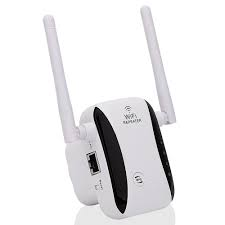
Repeater: It extends the length of the signal and allows it to transmit over the same network. In other words, it simply copies the signal bit by bit and re-generates at its original strength by operating at the physical layer.
Bridge: A bridge is a device that joins any two networks or host segments together. Its primary function in a networking architecture is to store and relay frames among the various connected segments. They transfer frames using the MAC or the Media Access Control. It can also prevent data crossing if the MAC addresses are wrong. Besides, it also links different physical LANs together to form a bigger logical LAN
Gateway: As the name suggests, the gateway is a passage that interlinks two networks together. It works as the messenger agent that takes data from one system, interprets it, and transfers it to another system. Gateways are also called protocol converters, and they can operate at various network layers
Access Point: First, as a regular wired network for wireless devices. Second, it’s a router for transferring data between different access points. The AP has various ports to expand the network’s size, firewall capabilities, and DHCP service. As a result, we have access points that act as a switch, DHCP server, router, and firewall.

BENEFITS OF NETWORKING
- Site (software) licences are likely to be cheaper than buying several standalone licences.
- Files can easily be shared between users.
- Network users can communicate by email and instant messenger.
- Data is easy to back up as all the data is stored on the file server.
- Networking offers a quick and easy way to share files directly.
- All computers in the network can share resources such as printers, fax machines, modems and scanners.
EVALUATION:
- Mention and explain five types of network devices
- Discuss four benefits of computer networking
CLASSWORK: As in evaluation
CONCLUSION: The teacher commends the students positively

First Term Data Processing Lesson Notes for Other Topics
Classification Of Computers
Explore lesson notes covering all topics.
History Of Computer
Explore lesson notes covering all topics.
Data And Information
Explore lesson notes covering all topics.
Digitalization Of Data
Explore lesson notes covering all topics.
History Of Computing
Explore lesson notes covering all topics.
Introduction to Computer Networking
Explore lesson notes covering all topics.
Internet I - Electronic Mail/ E-Mail Accounts
Explore lesson notes covering all topics.
Internet II - Internet & Search Engines
Explore lesson notes covering all topics.
Computer Virus
Explore lesson notes covering all topics.
Maintenance of Computer I
Explore lesson notes covering all topics.
Maintenance of Computer II
Explore lesson notes covering all topics.

Career Opportunities in Data Processing
Explore lesson notes covering all topics.
Computer Networking
Explore lesson notes covering all topics.

Lesson Notes for Other Classes
JSS1 Lesson Note
The complete lesson note to guide your studies.

JSS2 Lesson Note
The complete lesson note to guide your studies.

SS1 Lesson Note
The complete lesson note to guide your studies.
SS2 Lesson Note
The complete lesson note to guide your studies.