
Input Devices Basic 3 Computer Studies Lesson Note
Download Lesson NoteTopic: Input Devices
Input devices are computer parts that help us put information INTO the computer.
Common Input Devices
Mouse:
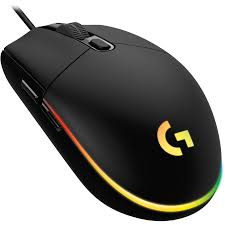
- Points and clicks on things on screen
- Has left and right buttons
- Scroll wheel in the middle
- Moves cursor (arrow) on screen
Keyboard:
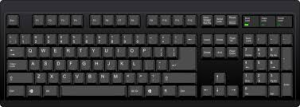
- Used for typing letters and numbers
- Has QWERTY layout (first 6 letters on top row)
- Space bar for spaces between words
- Enter key to go to next line
Scanner:
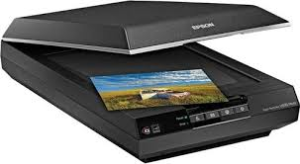
- Copies pictures and documents into computer
- Put paper on glass, press button
- Makes digital copies of photos and papers
- Saves scanned items as computer files
Flash Drive (USB):
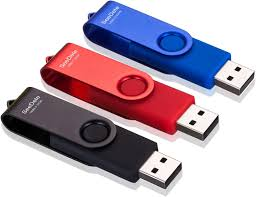
- Small storage device you can carry
- Plugs into USB port on computer
- Stores files like photos, documents, music
- Can transfer files between computers
Hard Drive:
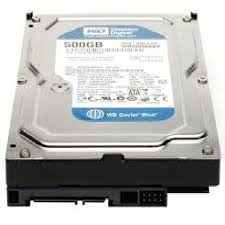
- Main storage inside computer
- Stores operating system and all programs
- Much bigger storage than flash drive
- Permanent storage – keeps files when computer is off
Exercise 2: Match the devices:
- For typing words: _______
- For pointing on screen: _______
- For copying pictures: _______
- For storing many files: _______
CLASS ACTIVITIES
Soil Investigation
If possible, bring different soil samples:
- Look at soil with a magnifying glass
- Feel different types – sandy, clay, loamy
- Find small living things in soil
Exercise 3: Soil Detective!
- What color is the soil outside our classroom? _______
- Can you see small stones in soil? _______
- Why do plants need soil? _______
Input Device Hunt
Look around the classroom/computer lab: Exercise 4: Find and count:
- Keyboards: _______
- Mice: _______
- Computers with hard drives: _______
- USB ports: _______
Practical Exercise
If computers are available:
- Practice moving mouse cursor around screen
- Type your name on keyboard
- Find the USB ports on computer
HOMEWORK
- Dig a small hole in your yard and describe the soil you see
- Ask your parents about input devices they use at work
- Draw a plant showing how its roots go into soil
Class Discussion: How would plants survive without soil? What would happen to our food?
Teacher’s Notes: ___________
Second Term Computer Studies Lesson Notes for Other Topics

Computer Room
Explore lesson notes covering all topics.

Computer Room
Explore lesson notes covering all topics.

Basic Safety for Computer Room
Explore lesson notes covering all topics.
System Application
Explore lesson notes covering all topics.

Important Computer Applications
Explore lesson notes covering all topics.
Difference Between Hardware And Software
Explore lesson notes covering all topics.

Components Of CPU
Explore lesson notes covering all topics.

More Parts Of The CPU
Explore lesson notes covering all topics.
Arithmetic Logic Unit (ALU) & Storage Unit in CPU
Explore lesson notes covering all topics.

Launching Microsoft Word
Explore lesson notes covering all topics.

Mini And Micro Computers
Explore lesson notes covering all topics.

Mainframe And Super Computers
Explore lesson notes covering all topics.

Computer Icons
Explore lesson notes covering all topics.

Setting Of A Computer
Explore lesson notes covering all topics.

Electronic Mails
Explore lesson notes covering all topics.
Lesson Notes for Other Classes
Basic 1 Lesson Note
The complete lesson note to guide your studies.

Basic 2 Lesson Note
The complete lesson note to guide your studies.

Basic 4 Lesson Note
The complete lesson note to guide your studies.

Basic 5 Lesson Note
The complete lesson note to guide your studies.

Basic 6 Lesson Note
The complete lesson note to guide your studies.

JSS1 Lesson Note
The complete lesson note to guide your studies.