
Classification of Computer Hardware SS1 Computer Hardware & GSM Repair Lesson Note
Download Lesson NoteTopic: Classification of Computer Hardware
The Input Units (The “Senses”)
Input devices are how we “talk” to the computer. They take information from our world and translate it into a language the computer understands (0s and 1s).
- The Keyboard: This is the most common. You press a key, and a character appears.
- The Mouse: This helps you point and click. It’s like your finger pointing at things on a shelf.
- The Scanner: This takes a physical paper and turns it into a digital picture.
- The Microphone: This captures your voice (sound) and sends it inside.
The Processing Unit (The “Chef”)
This is where the real work happens. Inside every computer or phone, there is a CPU (Central Processing Unit).
If you click “Play” on a video, the CPU is the part that says, “Okay, I need to start showing these images and playing this sound right now!” It is the brain of the machine. Without it, the computer is just a plastic box.
- The Motherboard: This is the big green board that holds the CPU. It acts like the “nervous system,” connecting all the parts together.
- The RAM (Random Access Memory): This is the “working table.” The more RAM you have, the more things the computer can do at once without “hanging.”
The Output Units (The “Result”)
Once the CPU has finished “thinking” or processing your command, it needs to show you the result. That’s what Output devices do.
- The Monitor (Screen): This shows you the visual result of your work.
- The Printer: This gives you a physical “hard copy” of your digital work.
- Speakers/Headphones: These let you hear the sound the computer is processing.
Simple Tip: If the information is coming OUT of the computer to you, it’s an Output device.
The Storage Units (The “Cupboard”)
Computers need a place to keep your files even when the power is turned off. Unlike RAM (which forgets everything when you switch off), Storage is permanent.
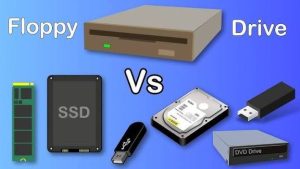
- Hard Disk Drive (HDD): These are like big libraries inside the computer that hold thousands of files.
- Solid State Drive (SSD): These are newer, much faster versions of hard drives. Most modern laptops use these.
- USB Flash Drives: These are small, portable sticks you can carry in your pocket to move files from one computer to another.
- Memory Cards (SD Cards): These are tiny chips used mostly in phones and cameras to store photos and videos.
How They All Work Together
To understand the flow, let’s look at a simple example: Typing a Letter.
- Input: You type the letter “A” on your Keyboard.
- Processing: The CPU realizes you pressed a key and tells the computer to draw the letter “A.”
- Output: The letter “A” appears instantly on your Monitor.
- Storage: You click “Save,” and the letter is kept safely on your Hard Drive so you can open it tomorrow.
Quick Summary Table
| Category | Job Description | Examples |
| Input | Sending data IN | Keyboard, Mouse, Mic |
| Processing | Doing the WORK | CPU, Motherboard |
| Output | Bringing data OUT | Screen, Printer, Speaker |
| Storage | Keeping data SAFE | Hard Drive, Flash Drive |
Class Activity: Look around the computer lab. Can you find one device that acts as both Input and Output? (Hint: Think about the screens on modern smartphones!)
First Term Computer Hardware & GSM Repair Lesson Notes for Other Topics
Computer Assembly I
Explore lesson notes covering all topics.
Tools for Computer and GSM Repairs
Explore lesson notes covering all topics.
Safety Rules and Workshop Practices
Explore lesson notes covering all topics.
Internal Components of a Computer
Explore lesson notes covering all topics.

Peripheral Devices
Explore lesson notes covering all topics.

Introduction to Computer Hardware and GSM Repairs
Explore lesson notes covering all topics.

Lesson Notes for Other Classes

Basic 2 Lesson Note
The complete lesson note to guide your studies.
Basic 3 Lesson Note
The complete lesson note to guide your studies.

Basic 4 Lesson Note
The complete lesson note to guide your studies.
Basic 5 Lesson Note
The complete lesson note to guide your studies.

JSS1 Lesson Note
The complete lesson note to guide your studies.

JSS2 Lesson Note
The complete lesson note to guide your studies.