Food (Classes and Use), Pathogens and Diseases, and Microsoft Powerpoint – Basic 4 Basic Science Lesson Note (Third Term)
Download Lesson NoteLesson note at a glance
- Subject
- Basic Science
- Class
- Basic 4
- Term
- Third Term
- Topic
- Food (Classes and Use), Pathogens and Diseases, and Microsoft Powerpoint
- Order
- Topic 4 of 7 this term
- Reading time
- 5 min
Food: classes and uses
Class: Primary 4
Duration: 30 minutes
Subject: Basic Science
Learning Objectives
By the end of this lesson, pupils will be able to:
- List the classes of food
- Explain the uses of food
- Describe what a balanced diet means
Classes of Food
- Carbohydrates (Energy Foods)
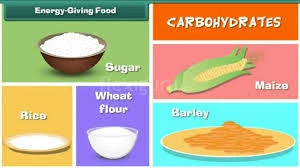
What they do: Give us energy to work and play Examples:
- Rice, bread, yam
- Potatoes, cassava
- Corn, wheat
- Proteins (Body Building Foods)
What they do: Help us grow and repair our body Examples:
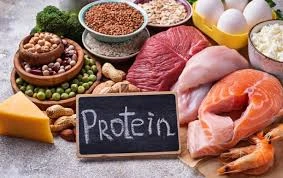
- Meat, fish, eggs
- Beans, milk, cheese
- Nuts, groundnuts
- Vitamins and Minerals (Protective Foods)
What they do: Keep us healthy and protect from sickness Examples:
- Fruits: oranges, apples, bananas
- Vegetables: spinach, carrots, tomatoes
- Milk, fish
- Fats and Oils
What they do: Give us energy and keep us warm Examples:
- Palm oil, groundnut oil
- Butter, margarine
- Coconut, avocado
- Water
What it does: Helps our body work properly Examples:
- Clean drinking water
- Water in fruits and vegetables
Uses of Food
Food helps our body to:
- Give us energy to run, play, and work
- Help us grow bigger and stronger
- Keep us healthy and fight sickness
- Repair our body when we get hurt
- Keep us warm in cold weather
Adequate Diet (Balanced Diet)
A balanced diet means eating foods from all the classes of food every day.
A balanced diet includes:
- Carbohydrates (like rice or bread)
- Proteins (like meat or beans)
- Vitamins (like fruits and vegetables)
- Fats (like oil or butter)
- Water (drink plenty of clean water)
Why we need balanced diet:
- To stay healthy and strong
- To grow properly
- To have energy for activities
- To fight diseases
- To think clearly in school
Simple Activity
Draw your favorite meal and identify which class of food each item belongs to.
Evaluation
- Name the five classes of food
- What do proteins do for our body?
- Give two examples of carbohydrates
- What is a balanced diet?
Pathogens and diseases
Class: Primary 4
Duration: 30 minutes
Subject: Physical and Health Education
Learning Objectives
By the end of this lesson, pupils will be able to:
- Define pathogens
- Name types of pathogens
- Explain what diseases are
- Distinguish between communicable and non-communicable diseases
What are Pathogens?
Pathogens are very tiny living things that can make us sick. They are so small that we cannot see them with our eyes. They are also called germs or microbes.
Types of Pathogens
- Bacteria
- Very small living things
- Can cause sore throat, stomach problems
- Some are good, some are bad
- Example diseases: Typhoid, cholera
- Fungi
- Plant-like germs
- Like to grow in warm, wet places
- Cause skin problems and infections
- Example diseases: Ringworm, athlete’s foot
- Virus
- The smallest pathogens
- Need other living things to survive
- Spread very easily
- Example diseases: Cold, flu, measles
- Protozoa
- Single-celled living things
- Often found in dirty water
- Can cause serious sickness
- Example diseases: Malaria, dysentery
What are Diseases?
Diseases are sicknesses that make our body not work properly. They make us feel bad and can stop us from doing normal activities.
Types of Diseases
- Communicable Diseases
What they are: Diseases that can spread from one person to another How they spread:
- Through air (coughing, sneezing)
- Through touch
- Through dirty water or food
- Through insect bites
Examples:
- Malaria (from mosquito bites)
- Cold and flu (through air)
- Cholera (through dirty water)
- Measles (through air and touch)
- Non-Communicable Diseases
What they are: Diseases that cannot spread from person to person What causes them:
- Poor eating habits
- Not exercising
- Family history
- Old age
Examples:
- Diabetes (too much sugar)
- Heart disease
- Cancer
- High blood pressure
How to Prevent Diseases
- Wash hands regularly with soap
- Eat clean, healthy food
- Drink clean water
- Cover mouth when coughing
- Sleep under mosquito nets
- Exercise regularly
- Keep surroundings clean
Simple Activity
Practice proper hand washing with soap and water.
Evaluation
- What are pathogens?
- Name two types of pathogens
- What is the difference between communicable and non-communicable diseases?
- Give one example of each type of disease
Microsoft powerpoint: tool bar
Class: Primary 4
Duration: 30 minutes
Subject: Computer Studies
Learning Objectives
By the end of this lesson, pupils will be able to:
- Identify what Microsoft PowerPoint is
- Locate the toolbar in PowerPoint
- Name important tools in the toolbar
What is Microsoft PowerPoint?
Microsoft PowerPoint is a computer program that helps us create presentations with slides. We use it to show pictures, text, and information to other people.
What is a Tool Bar?
A toolbar is a row of buttons and icons at the top of the PowerPoint screen. These tools help us do different things in our presentation.
Important Tools in PowerPoint Toolbar
File Menu
- New – Create a new presentation
- Open – Open an existing presentation
- Save – Save your work
- Print – Print your slides
Home Tab Tools
- Cut – Remove text or pictures
- Copy – Make a copy of text or pictures
- Paste – Put copied items somewhere else
- Bold – Make text thick and dark
- Italic – Make text slanted
- Underline – Put a line under text
Insert Tab Tools
- Text Box – Add text anywhere on slide
- Picture – Add photos to your slide
- Shapes – Add circles, squares, and other shapes
- Clip Art – Add cartoon pictures
Design Tab Tools
- Themes – Change how your slides look
- Colors – Change slide colors
- Background – Change what’s behind your text
Animation Tab Tools
- Animation – Make text and pictures move
- Effects – Add special movements to slides
How to Use the Toolbar
- Click on the tab you want (Home, Insert, Design)
- Look for the tool you need
- Click on the tool to use it
- The tool will work on your slide
Simple Activity
Open PowerPoint and find the Home tab. Click on the Bold button and type your name.
Evaluation
- What is Microsoft PowerPoint used for?
- Where is the toolbar located?
- Which tool makes text thick and dark?
- Which tab helps you add pictures to slides?
This term's Basic Science topics
Basic 4 Third Term · 7 topics
- Shape Construction with Wood or Metal, Athletics, Data Processing
- Types of Building, Relay Skills, and Information
- Vehicles, Volleyball and Information
- Food (Classes and Use), Pathogens and Diseases, and Microsoft Powerpoint
- Harmful Foods, Spread of Diseases, Launching of Microsoft
- The Digestive System & Disease Preventive Measures
- Human Body (The Mouth), Drug Education, and Search Programming
Third Term Basic Science Lesson Notes for Other Topics
Simple Machines
Read the full lesson note.
Simple Machines - The Safe Use of Simple Machines
Read the full lesson note.
Concept of Technology
Read the full lesson note.
Technology in Home - Electric Gadgets
Read the full lesson note.
Technology in Transportation - Land and Air
Read the full lesson note.
What Is Water Transportation?
Read the full lesson note.
Exploring Your Environment I
Read the full lesson note.
Exploring Your Environment II
Read the full lesson note.

Exploring Your Environment III
Read the full lesson note.
Animals - As Living Things (Characteristics)
Read the full lesson note.

Uses of Animals
Read the full lesson note.
Meaning and Characteristics of Plants
Read the full lesson note.

Meaning and Characteristics of Animals
Read the full lesson note.
Plants - As Living Things II
Read the full lesson note.
Uses of Plants
Read the full lesson note.
Lesson Notes for Other Classes

Basic 1 Lesson Note
The complete lesson note to guide your studies.
Basic 2 Lesson Note
The complete lesson note to guide your studies.
Basic 3 Lesson Note
The complete lesson note to guide your studies.
Basic 5 Lesson Note
The complete lesson note to guide your studies.
Basic 6 Lesson Note
The complete lesson note to guide your studies.

JSS1 Lesson Note
The complete lesson note to guide your studies.