
Web Design SS2 Data Processing Lesson Note
Download Lesson NoteTopic: Web Design
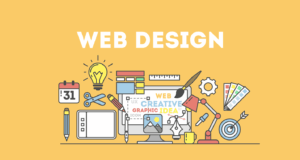
Website design means planning, creation and updating of websites. Website design also involves information architecture, website structure, user interface, navigation ergonomics, website layout colours, contrasts, fonts and photography as well as icon design. All these website elements combined to form websites.
UNDERSTANDING A WEB PAGE
A web page is a text file containing Hypertext Markup Language (HTML) formatting tags and links to graphic files and other web pages through a web server. Web pages are unique in such a way that they can be interactive and use multimedia. The main thing to remember when creating a web is to establish a goal by setting many links.
USES OF A WEB DESIGN PACKAGE
A web page is used to create web pages. Other uses include:
- Accessibility Checker: This gives the users the ability to check if their code is standard compliant and their website is easily accessible for people with disabilities.
- Split View Option: Allow users to code in code view and preview in design view without the hassle of switching from the design and code view tab.
- Interactive Buttons: Give users a new easy way to create web graphics for navigation and eliminate the need for a complicated image–editing package such as Adobe Photoshop.
- Dynamic Web Template (DWT): Allow users to create a single template that could be used across multiple pages and even the whole website.
- Code Snippets: Give users the advantage to create snippets of their commonly used pieces of code allowing them to store them for easy access when next it is needed.
COMPONENT OF A WEB DESIGN PACKAGE
- A Solid Layout: In web design, the foundation is your layout. Laying out a web design involves placing all the content and navigational elements.
- Effective Typography: It is the flow of the words and it is important for a web design’s typography to be easy to read and follow while establishing structure and hierarchy within the content.
- The Right Color Scheme: Choosing the right colour scheme is extremely important because it will set the mood of your design more so than any other component.
- Appropriate Design Elements: Your creativity can go wild here with texture, icons, patterns, etc. However, keep in mind that design elements also play a big role in setting the mood of the design. So keep things consistent with the goals of the website and its audience.
- Hit Counter: This gives details about the number of visitors to a website through a graphic counter.
- Advertising Banner: The advertising banner will produce an ad-banner rotator with images of your choice. Ad-banners are usually used to generate revenue and can however be used to rotate many images to create slideshow effects.
- Table of Contents: This will repeatedly create a page with hyperlinks to each page on your site. The table of contents can be used as a site map.
- Marquees: A marquee is a text that scrolls across the screen. The marquee is used when you want to draw attention to a certain point.
- Scheduled Pictures: This component can be used when you have a limited offer or you want to add variety to your page,
- Search Form: This lets one have an easy way to search one’s site.
EXAMPLES OF A WEB DESIGN PACKAGE
- iWeb: iWeb allows users to create websites and blogs and customize them with their text, photos and movies. iWeb integrates with other services, including Facebook, YouTube, Google Adsense and Google Maps. It allows users to create a website in just a few minutes without the knowledge of programming or HTML. iWeb provides beautiful, Apple-designed templates that you can easily customize so don’t have to worry about design.
- Microsoft FrontPage: It is a web tool that allows users to create custom websites without having to know HTML code. It helps you to manage the pages on your web as well as create and edit web pages in a What-You-See-Is-What-You-Get (WHSIWYG) fashion.
- Adobe Dreamweaver: It is a web design package that is suitable for everything from simple page design to the development of dynamic pages written with ColdFusion, PHP, ASP, CSS, XML, XSLT, and JavaScript. Dreamweaver is the most powerful, most fully featured web developer tool. It combines a great WYSIWYG editor, an FTP client, and a convenient scripting environment.
- Microsoft Expression Web & Studio: It is a web design tool you can use to design and develop web pages using XML, CSS, ASP.NET, ASP.NET AJAX, XHTML, XSLT, PHP and JAVAScript. Expression Web requires .NET Framework and Silverlight to install and run. It uses its standards-based rendering engine which is different from Internet Explorer’s Trident engine.
- Webplus X4: This is the quick and easy way for anyone who wants to create and publish eye-catching desktop and mobile sites, without having to use any code.
- NetObjects Fusion: These are commercial programs with graphical user interfaces that generate HTML or XHTML through their proprietary database.
- Amaya: This is a free and open-source WYSIWYG authoring tool with browsing abilities. It has XML-based capabilities such as XHTML, MathML and Scalable Vector Graphics (SVG). It displays free and open image formats such as PNG and SVG, as well as a subset of SVG animation.

Third Term Data Processing Lesson Notes for Other Topics
Graphic Packages
Explore lesson notes covering all topics.
Internet
Explore lesson notes covering all topics.
Presentation Packages
Explore lesson notes covering all topics.
Marketing
Explore lesson notes covering all topics.
Safety Measures
Explore lesson notes covering all topics.
Computer Ethics
Explore lesson notes covering all topics.
Database Management System II
Explore lesson notes covering all topics.
Database Management System
Explore lesson notes covering all topics.
Word Processing II
Explore lesson notes covering all topics.
Spreadsheet
Explore lesson notes covering all topics.


Lesson Notes for Other Classes

JSS1 Lesson Note
The complete lesson note to guide your studies.
JSS2 Lesson Note
The complete lesson note to guide your studies.

SS1 Lesson Note
The complete lesson note to guide your studies.

SS3 Lesson Note
The complete lesson note to guide your studies.